Database Branching for AI Agents: PostgreSQL Copies in Milliseconds, Not Minutes
 Sergey Pronin, founder of Solanica and maintainer of OpenEverest (CNCF Sandbox)
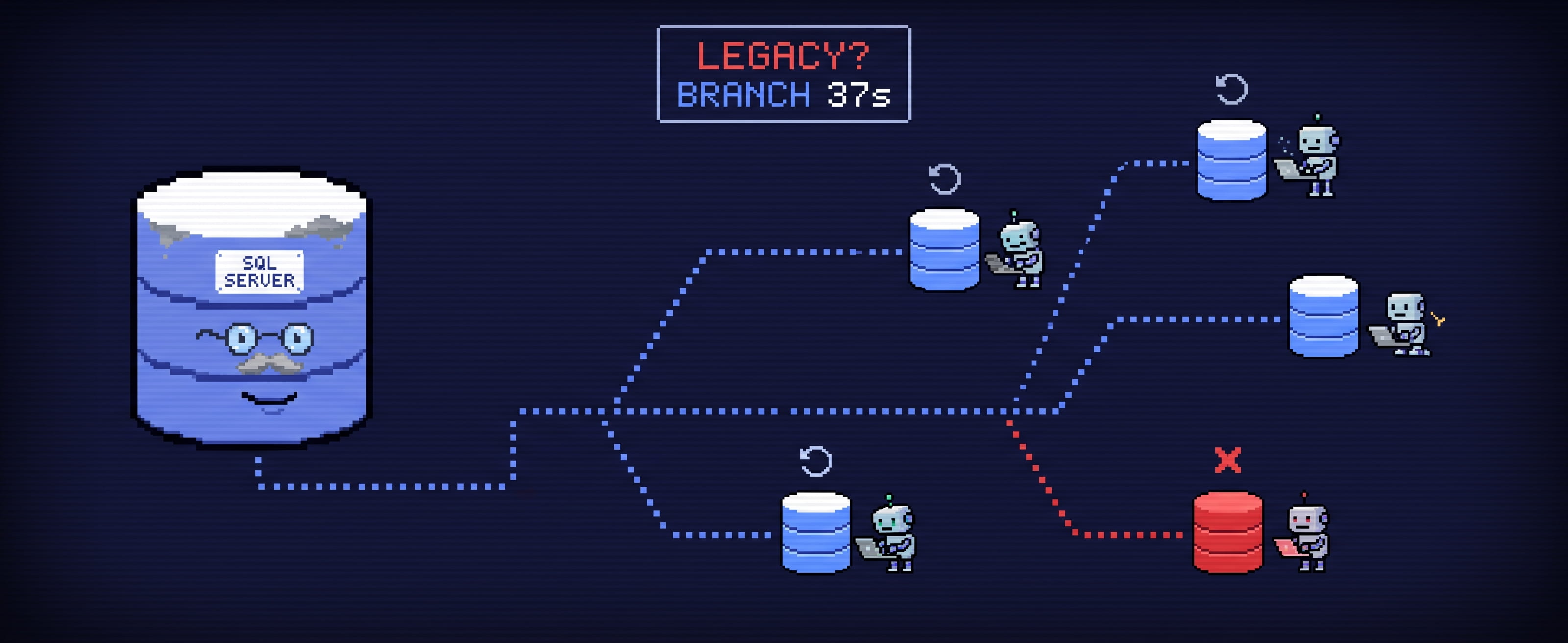
When developers need a database, they get it from some kind of DBaaS: a managed cloud service, a ticket to the DBA team, or a private platform such as OpenEverest. Usually a development database starts from a backup: the schema plus some data, obfuscated if it contains PII. How long that takes depends on the infrastructure and the amount of data. With a few gigabytes it takes minutes, sometimes tens of minutes. Without a DBaaS, it takes hours.
Now give those developers AI agents, or make the agents the developers. They call the DBaaS API, or a script you wrote, and each agent gets a database of its own. That works for one agent. For hundreds or thousands it means hundreds or thousands of instances: compute and storage for each, which is a large bill in the cloud and wasted hardware on-prem. And an agent that waits 15 minutes for its database spends most of its time waiting: the database becomes the bottleneck.
That’s why “agentic databases” and “databases for AI agents” are suddenly everywhere. The usual way of handing out databases is too slow and too expensive for agents.
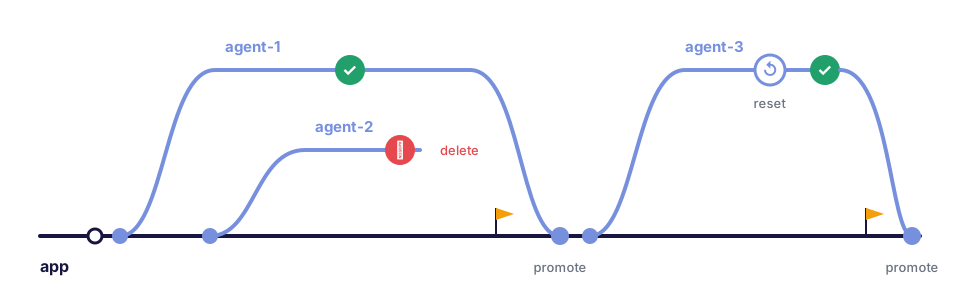
What an agent needs from a database
Agents work in loops. They try something, check the result, throw it away and try again. A database that fits that loop has to be:
- Instant. A copy of production-sized data in seconds, not minutes.
- Cheap. A copy costs nothing until it changes. Most agent copies change very little.
- Disposable. Created and deleted by an API call or a manifest, with no ticket.
- Undoable. A save point before a risky step, and a way back to it.
- Mergeable. When the agent gets it right, and a human agrees, its work becomes the real database.
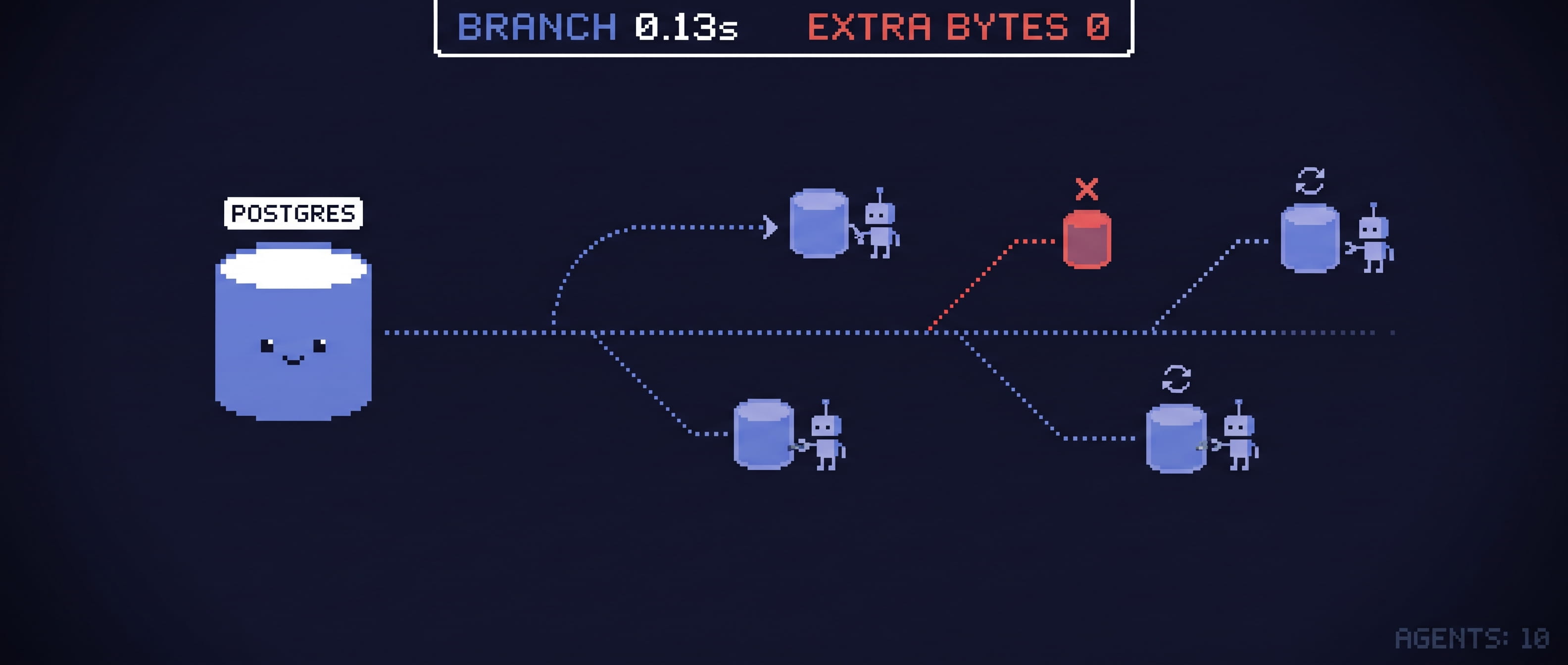
That’s branching: a writable copy of a database, as of now, that shares its data with the source until either side writes.
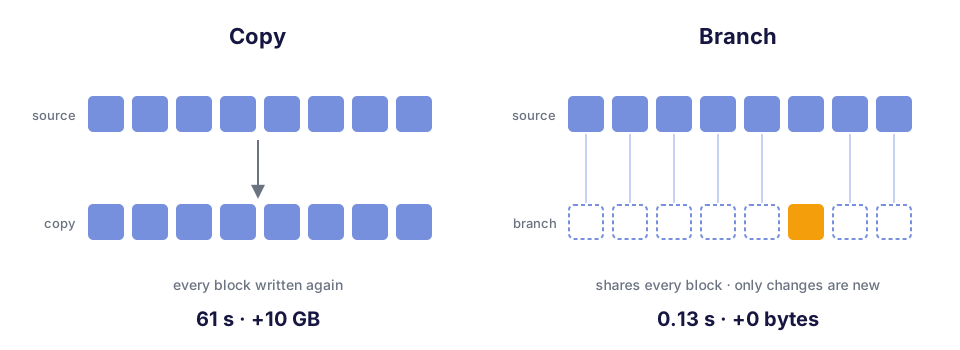
Neon made the idea popular for PostgreSQL, built on its own storage engine. We wanted the same experience on standard PostgreSQL, on your own Kubernetes, with the databases you already run through OpenEverest.
What we built
plugin-branching is an OpenEverest plugin. It adds a Branches tab to the instance page: branches, restore points and recent operations in one place.
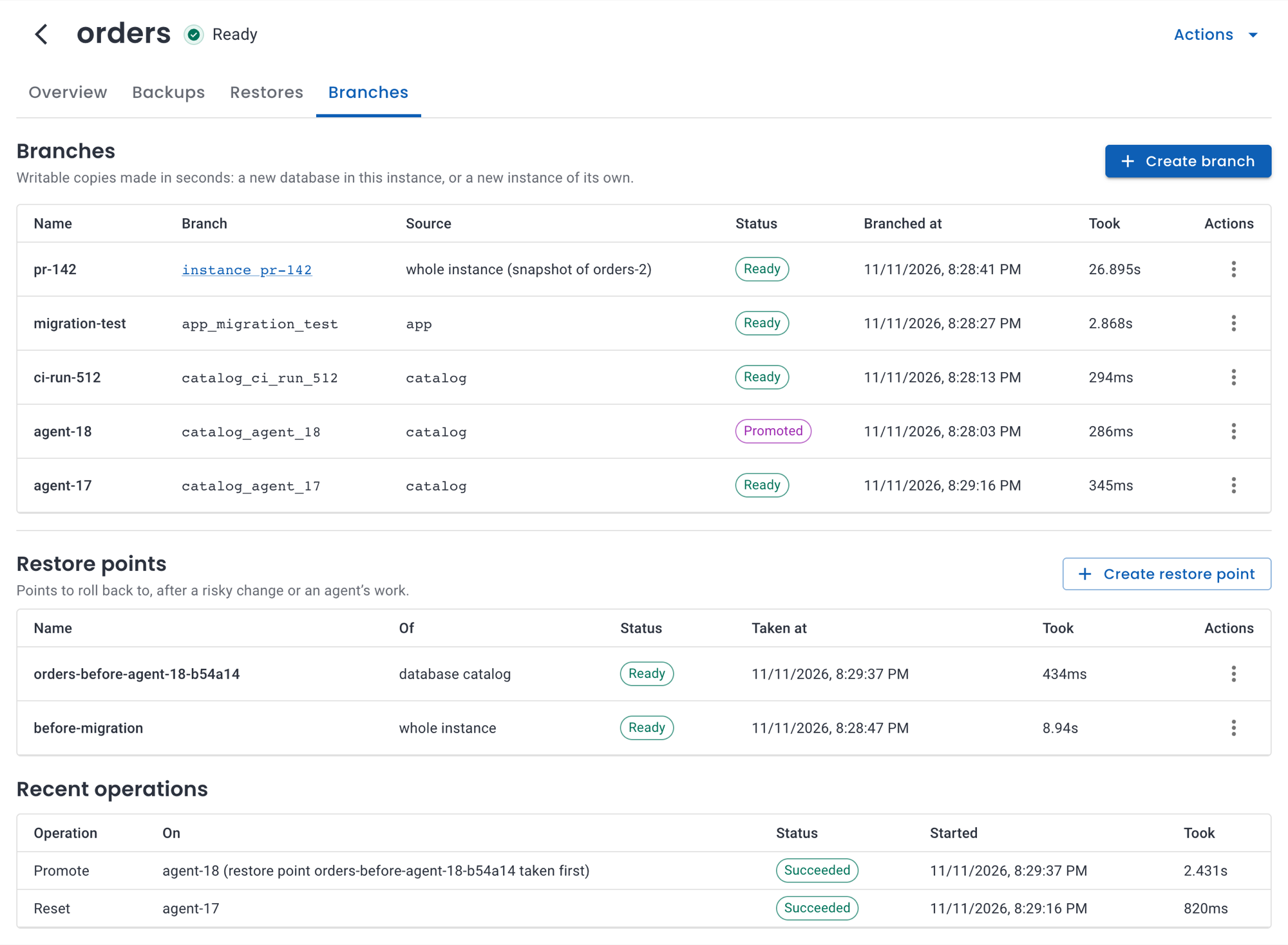
Everything in the tab is a Kubernetes resource, so an agent, a CI job or GitOps can do the same with a manifest or an API call:
apiVersion: plugin-branching.plugins.openeverest.io/v1alpha1
kind: Branch
metadata:
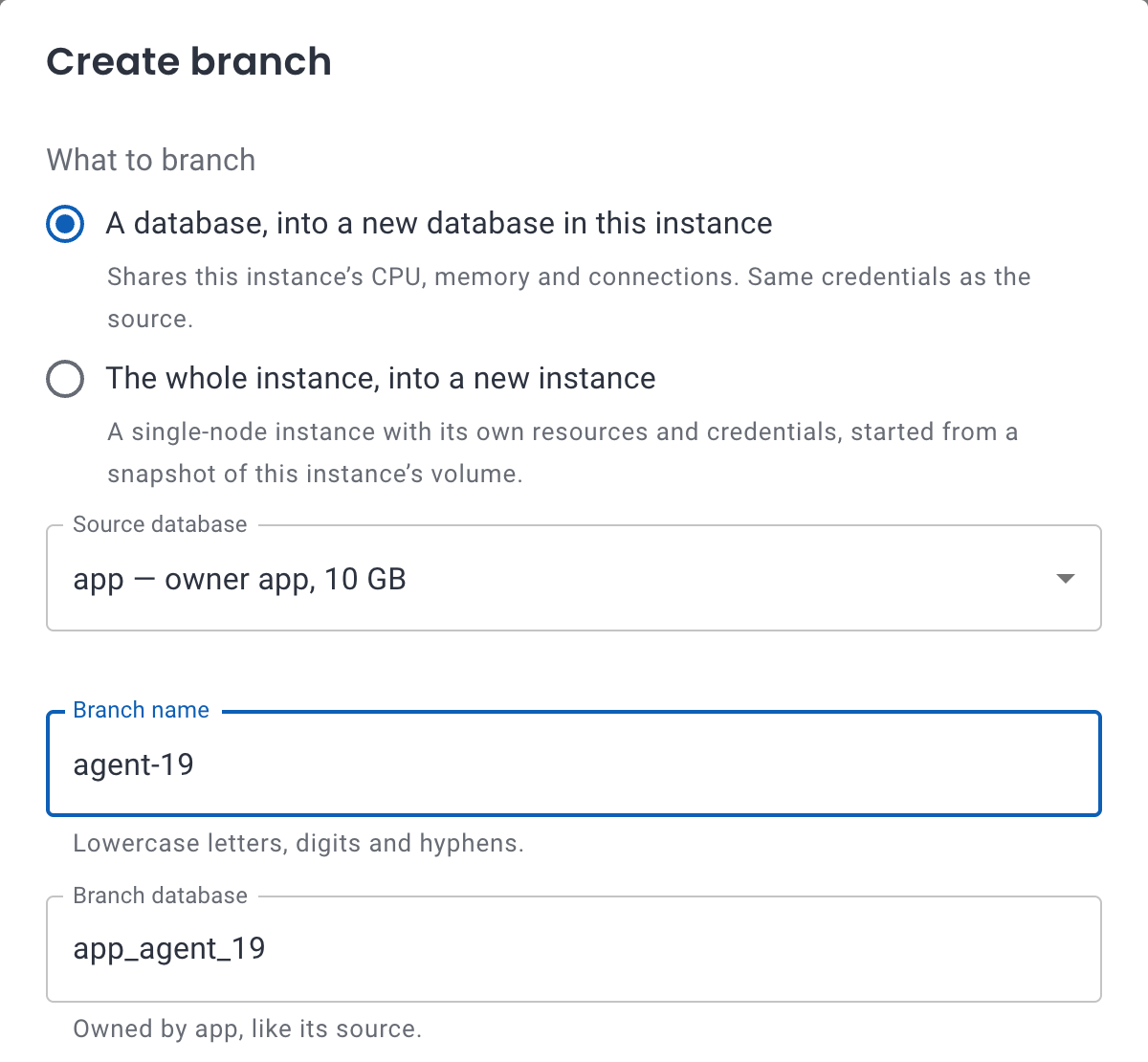
  name: agent-19
  namespace: team-a
spec:
  instanceRef:
    name: orders            # the PostgreSQL instance to branch
  source:
    database: app
  database: app_agent_19    # the branch, ready in milliseconds
A branch isn’t only a copy. Each one comes with the rest of the loop:
- Reset: the branch gets a fresh copy of its source, as of now.
- Restore point: a save point before a risky change.
- Rollback: go back to a restore point.
- Promote: the source gets the branch’s data. A restore point is taken first, so a promotion can be undone.
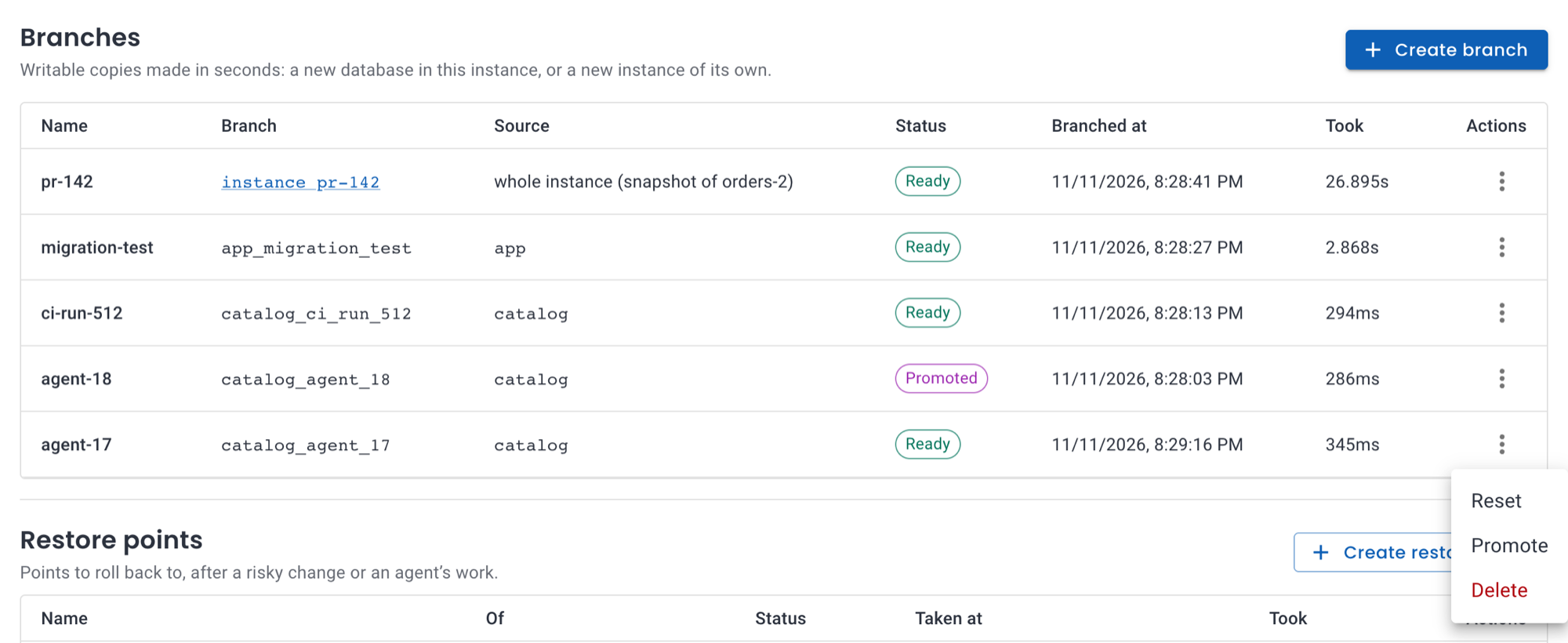
The plugin needs neither the superuser nor the application’s credentials. Every request from the UI or API is checked against OpenEverest’s RBAC as the user who made it.
Two kinds of branch
“Branch” can mean two different things, and the plugin does both.
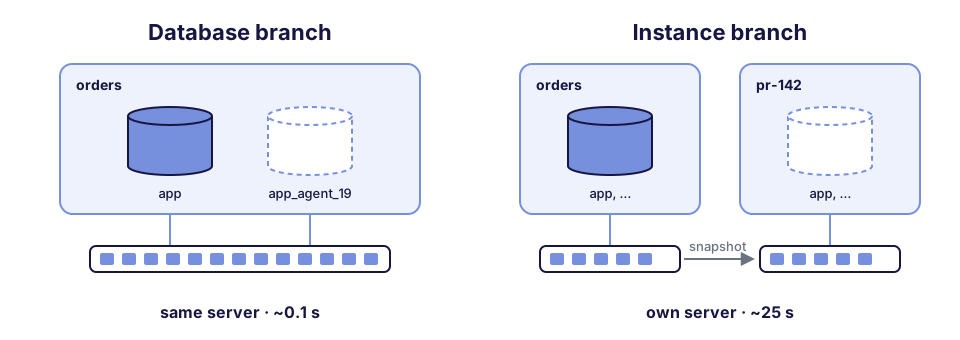
A database branch (method: Clone) is a new database in the same
PostgreSQL server. PostgreSQL 18 can create a database from another one by
asking the file system to clone its files
(file_copy_method = clone)
instead of copying them. On a file system with reflinks, such as XFS, Btrfs
or ZFS, the new database shares every block with the source. No new pods,
no new volume, nothing to start:
- Made in about 0.1 seconds on XFS, whatever the size, so hundreds of branches are cheap.
- Same credentials. The branch has the same owner as its source, so the application only changes the database name.
- Shared server. It shares the server’s CPU, memory and connections. It covers one database, and roles are shared with the source.
- Briefly blocks the source. PostgreSQL copies a database only while nobody else is connected to it, so the source’s sessions are disconnected for the duration of the copy.
An instance branch (method: Snapshot) is a new PostgreSQL instance of
its own. Its volume is a copy-on-write snapshot of the source’s: a
standby’s when there is one, so the primary isn’t touched. This is the
model Neon made popular, with its own compute on shared storage:
- Its own compute. Its own pods, CPU, memory, configuration and endpoint, with every database and role of the source.
- No effect on a busy source. The snapshot is taken from a standby.
- Ready in about 25 seconds, whatever the size.
That’s the honest difference from Neon. Neon separates storage from compute in its own engine, so its compute starts almost at once. An instance branch is a standard PostgreSQL on standard Kubernetes storage, and most of the 25 seconds is that PostgreSQL starting up. In exchange, there’s no new storage engine to run, and the data stays on your volumes.
Instance branches need the right storage under the hood. An instance branch is only as fast and as cheap as the volumes it's made of. Your Kubernetes storage has to snapshot a volume and create a new volume from that snapshot without copying the data: copy-on-write snapshots and clones, exposed through the CSI snapshot API.
We used OpenEBS ZFS LocalPV. Its snapshots and clones are instant, but they live on the node of the source volume, so every instance branch runs on that node. To branch at scale across nodes, use a storage platform with instant, space-efficient snapshots and clones, such as Portworx, Ceph RBD through Rook, or NetApp ONTAP through Trident.
Storage that "clones" a volume by copying it, as some cloud block storage does, gives you a copy, not a branch: minutes per branch, and the full size every time. Database branches don't have this requirement: a file system with reflinks, such as XFS on ordinary block storage, is enough.
Which one to use
| You need | Database brancha new database, same server | Instance brancha new instance, its own server |
|---|---|---|
| A database for an agent task or a CI job | 0.1 s, no new pods | works, but ~25 s and a server each |
| Hundreds of short-lived copies | nearly free | a server for each one |
| To branch a busy production database | pauses its clients for seconds | no effect on the primary |
| Load tests or heavy queries | competes with the source for CPU | its own CPU and memory |
| Different configuration or extensions | the source's settings | its own |
| A preview environment with its own endpoint | same endpoint, another database | its own endpoint |
| Every database and role | one database | the whole instance |
In short: database branches for volume and speed, instance branches for isolation. An agent that runs a thousand tasks a day wants database branches. A pull request that needs a preview environment next to a busy production database wants an instance branch.
The numbers
We measured both kinds on a three-node Kubernetes cluster with 4 vCPUs and 8 GB of memory per node:
- Database: PostgreSQL 18.6 on CloudNativePG, a primary plus a standby, holding a 10 GB pgbench database (70 million accounts).
- Storage: database branches ran on network block storage formatted as XFS. Instance branches ran on local disks with ZFS (OpenEBS ZFS LocalPV).
Copying 10 GB
| How | Time | Extra space |
|---|---|---|
CREATE DATABASE … TEMPLATE (PostgreSQL’s default) | 86 s | +10.3 GB |
| The same, copying files instead of WAL | 61 s | +10.2 GB |
| Database branch | 0.13 s | +0 bytes |
That’s a few hundred times faster, and the standby clones the branch as
well instead of copying it. From kubectl apply to a Ready branch it’s
about a second; most of that is Kubernetes noticing.
Ten agents at once
Ten database branches of the 10 GB database, requested at the same moment, were all ready in 6.8 seconds: 100 GB of databases in zero extra bytes. Deleting all ten took 4 seconds.
Every operation, both kinds
How long each operation took on the 10 GB database, with no clients connected:
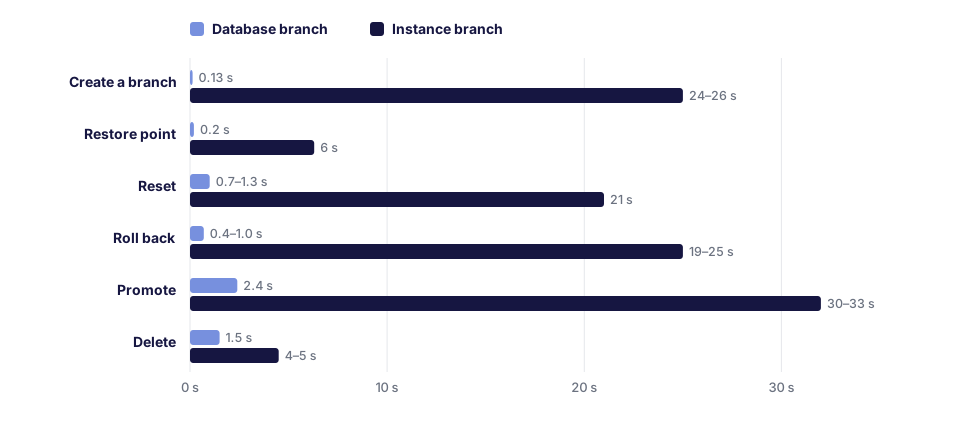
Branching production
We created an instance branch while the source was serving about 1,450 transactions per second. The branch was ready in 35 seconds, and the source’s clients saw no errors and no pause longer than 84 ms, which is ordinary jitter.
An agent’s loop, end to end
Here’s what we scripted against the 10 GB database. The agent’s task was a schema change: add a column, backfill it and index it.
- Branch
appintoapp_agent_19: 0.14 s. - The agent makes a mistake: a
DELETEwithout aWHERE, then a dropped table. - Reset the branch: 0.7 s. The data is back as it is in
app. - The agent runs the right migration and its tests pass on the branch. The migration took 71 s; that’s PostgreSQL building an index on 70 million rows, not branching.
- A human approves and the branch is promoted: 2.5 s. A restore
point of
appis taken first.appnow has the new column, and the application keeps its connection string. - Changed your mind? Rolling back to that restore point takes 0.4 s.

The mistake never reached app, and branching took 3.7 seconds of the
loop. The rest was the migration itself.
What to know
- A database branch briefly blocks its source database.
- The copy takes milliseconds, but a source under heavy writes first flushes its dirty data to disk. In our tests that meant a 2–8 second pause for that database’s clients.
- Branch development and staging databases this way, or sources that are idle at the moment. To branch a busy production database, use an instance branch.
- The storage matters.
- Database branches are instant on file systems with reflinks: XFS (the
default of modern
mkfs.xfs), Btrfs and ZFS. On ext4, the default of most CSI drivers, a branch is a full copy. - XFS on ordinary block storage is the sweet spot for database branches. On ZFS a cloned database shares blocks in the pool, but counts in full against the volume’s size, on the primary and on every standby. In our tests 39 branches of a 1.5 GB database filled a 10 GB volume and stopped both servers. ZFS volumes are thin-provisioned, so size them for the databases and all their branches: it costs no disk.
- Instance branches need copy-on-write snapshots and clones in your Kubernetes storage (see Two kinds of branch).
- Database branches are instant on file systems with reflinks: XFS (the
default of modern
- Branches aren’t free forever. A branch owns only what it writes. The source’s blocks that change after the branch point stay allocated while the branch exists, so give branches a lifetime.
- Rolling back or promoting an instance branch restarts the instance. Clients see about 20–35 seconds without service while the volumes are swapped, even with connections still open when it starts.
Where it fits
- Agent sandboxes. Each task gets a database branch, and the agent can break it freely and reset it in a second.
- Many agents, one winner. Several agents try different indexes or query rewrites on their own branches. You benchmark them and promote the best one.
- CI. Each job gets a database with real data and no fixture loading.
- Preview environments. Each pull request gets an instance branch of its own, deleted when the PR closes.
- Migration rehearsals. See how long a migration takes, and what it locks, on production-sized data.
- Incident debugging. Branch production as of now with an instance branch, and dig in without touching it.
Try it
plugin-branching works with PostgreSQL instances on OpenEverest through provider-cloudnative-pg, and with MariaDB instances through provider-mariadb. MariaDB gets instance branches, with replication or Galera, from the same Branches tab; rolling back or promoting a Galera cluster can take several minutes while its nodes resynchronize. The plugin-branching docs cover both kinds of branch, the operations, the HTTP API and the custom resources, and Databases for AI Agents sums up what the plugin does for agents, CI and preview environments.
The plugin is not open source. We’re looking for teams to try it on their own clusters and tell us what their agents, CI and developers need from database branches. If that’s you, let us know.