Bringing MariaDB to the Agentic World: Database Branching, Tested
 Sergey Pronin, founder of Solanica and maintainer of OpenEverest (CNCF Sandbox)
MariaDB runs a large part of the web: WordPress, WooCommerce, Magento, Nextcloud, and countless in-house apps. Those are exactly the apps AI agents are now asked to work on. Write the migration. Fix the slow query. Upgrade the plugin and see what breaks.
An agent can’t do that on production, and a stale dump on a laptop isn’t production. It needs its own copy of the real database: made in seconds, thrown away freely, and with an undo button.
We’ve shown database branching for PostgreSQL and SQL Server. This post brings it to MariaDB, a database we care about a lot, and it’s about the tests as much as the feature: before writing it, we spent a day measuring it and trying to break it.
What a MariaDB branch is
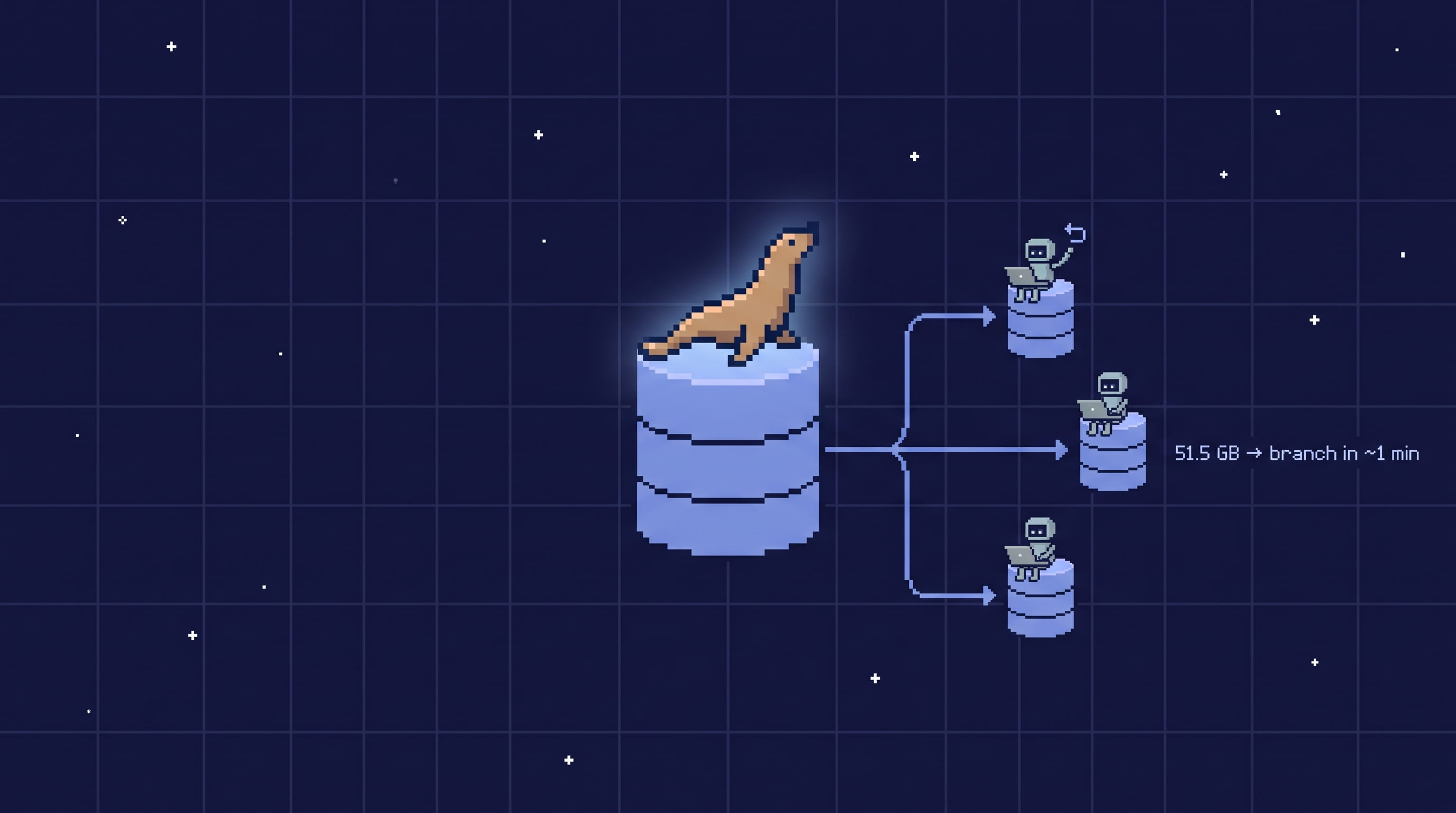
plugin-branching is an OpenEverest plugin. For MariaDB, a branch is a new MariaDB instance whose disk starts as a copy-on-write snapshot of the source’s. It shares every block with the source until either side writes, so it takes about the same time and almost no disk whatever the database size.
A branch is a Kubernetes resource, so an agent, a CI job or GitOps can ask for one:
apiVersion: plugin-branching.plugins.openeverest.io/v1alpha1
kind: Branch
metadata:
  name: shop-agent-7
  namespace: shop
spec:
  instanceRef:
    name: shop              # the MariaDB to branch
  method: Snapshot
  instanceName: shop-agent-7
  resources:                # optional: smaller than production
    requests: {cpu: 250m, memory: 1Gi}
Then the agent’s loop:
- Reset: the branch gets a fresh copy of production, as of now.
- Restore point: a save point before a risky change.
- Rollback: go back to a restore point.
- Promote: the source gets the branch’s data. A restore point of the source is taken first, so a promotion can be undone.
It works for standalone, replication and Galera instances. On a replication instance the plugin snapshots a replica once it has applied everything the primary had, so production keeps serving. Each branch gets its own root password, and its replication settings are cleared so it can never connect back to production.
Branches are placed with care. With node-local copy-on-write storage, a
branch runs on the node of the disk it’s copied from, so the plugin picks a
replica whose node has room for the branch, and checks a promotion fits
before it changes anything. resources lets a branch run smaller than
production: an agent rarely needs production’s CPU and memory. See
Node capacity
in the docs.
How we tested it
Our lab: a Kubernetes cluster with three 8-CPU, 32 GB database nodes and a separate node for load, ZFS on the nodes with OpenEBS ZFS LocalPV, OpenEverest 2.0.0-alpha.1 and MariaDB 12.3.
We didn’t just time things. While branching, a checker wrote to the source non-stop: numbered rows per writer with checksums, and money transfers between accounts whose total must never change. For each copy we checked that it held every write acknowledged before the request, no corrupt row, and the right total.
The numbers
A 2-node replication instance, with 5 GB and then 51.5 GB of data:
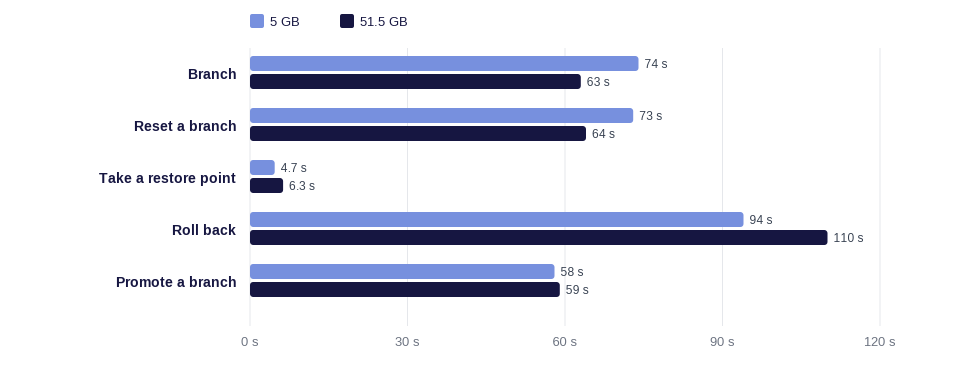
| 5 GB | 51.5 GB | Galera, 3 nodes | |
|---|---|---|---|
| Branch | 74 s | 63 s | 53 s |
| Reset a branch | 73 s | 64 s | – |
| Take a restore point | 4.7 s | 6.3 s | 8.4 s |
| Roll back | 94 s | 110 s | 3 min 35 s |
| Promote a branch | 58 s | 59 s | 3 min 21 s |
- Size doesn’t matter. The 51.5 GB branch was as fast as the 5 GB one. The time is MariaDB starting on the copy and recovering, plus giving the branch a root password of its own, not copying data.
- No lost writes. Every branch, reset, rollback and promote held every write acknowledged before it, with no corrupt rows and the money total intact.
Galera is slower to roll back and promote because one node restarts the cluster and the other two copy its data as they join.
Production doesn’t notice
Branches are taken from a replica, so the primary keeps its pace. We ran sysbench at about 1,500 transactions per second on the primary of the 51.5 GB instance while branching, taking a restore point and resetting:
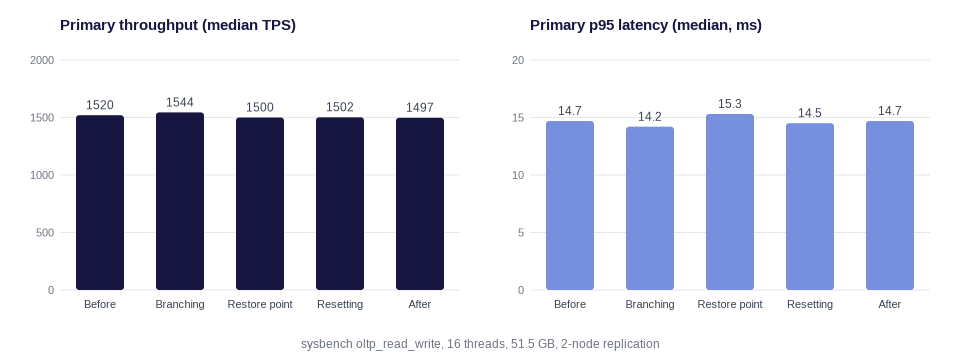
No second of the run dropped below half the median throughput, and the worst p95 latency during the operations (18.9 ms) was lower than the worst before them (20.4 ms).
Ten agents at once
Agents work in parallel. We asked for ten branches of a 1 GB database at the same time:
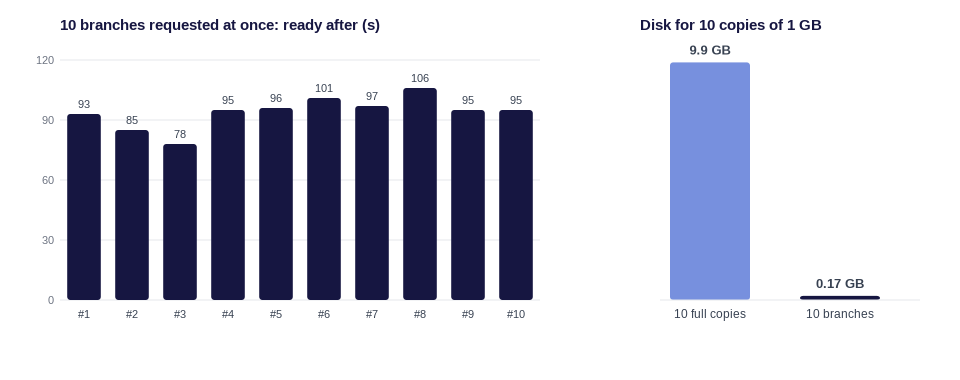
All ten were ready within 106 seconds, compared with about a minute for one. Together they used about 170 MB of disk, mostly InnoDB recovery writes, where ten full copies would take almost 10 GB.
Hardened for real clusters
We then ran the things that happen in real clusters:
- Two operations at once. A reset and a promote of the same branch, and two promotes of different branches, sent together. They ran one at a time, in order, each promote with its own restore point.
- Killing the plugin mid-rollback, at 1 to 7 seconds in and repeatedly. All seven rollbacks finished, and MariaDB was never left paused.
- Killing the primary two seconds after a branch request. The operator failed over, the branch was made from the surviving node, and no acknowledged write was lost.
- Deleting things too early: a branch while it was being created, a restore point while rolling back to it. Both were cleaned up correctly.
What to know
- Branches are instances. Each one is a MariaDB server with its own memory, so give branches small resources and a lifetime.
- Use parallel replication. Under heavy writes a single-threaded
replica fell minutes behind, and the plugin waits for a caught-up
replica before branching.
slave_parallel_threads=8kept the replica current under the same load. - GTIDs go back after a rollback or promote. The instance returns to an older binary log position. Re-sync anything that follows the binlog (external replicas, CDC tools) and take a fresh backup.
- The storage matters. You need Kubernetes storage with copy-on-write snapshots through the CSI snapshot API, such as ZFS LocalPV.
- Branches hold production data. Mask personal data on the source, or branch a masked copy.
Try it
MariaDB branches need plugin-branching v0.2.1 or later, provider-mariadb 0.3.0 or later and storage with copy-on-write snapshots. The plugin-branching docs explain how MariaDB branches work, and Databases for AI Agents sums up what the plugin does for agents, CI and preview environments.
The plugin is not open source. We’re looking for MariaDB teams to try it on their own clusters and tell us what their agents need. If that’s you, let us know.

 Solanica Team