Model-as-a-Service with OpenEverest: Your Own OpenAI-Compatible API on Kubernetes
 Sergey Pronin
Almost every platform team I talk to these days runs models and inference workloads locally. Sometimes it is data sovereignty, sometimes cost, sometimes the GPUs are already there and nobody uses them well. The pattern has a name - Model-as-a-Service (MaaS) - and it looks a lot like Database-as-a-Service did ten years ago.
And just like DBaaS back then, building it yourself is a puzzle. KServe and vLLM to run the model. Gateway API and Envoy to expose it. An AI Gateway to route by model name. cert-manager for TLS. API keys per team, token quotas, scaling the model that does not fit into one server, Prometheus for metrics. Every piece is great on its own. Gluing them together is a project.
In this post I will show how to get there with OpenEverest and the KServe provider for it. By the end you will have:
- a model deployed with one click in the UI (or ~20 lines of YAML),
- served over HTTPS on a single OpenAI-compatible endpoint,
- protected by a per-model API key and an hourly token quota,
- and, as a bonus, a model split across three GPU nodes.
Models are just another Instance
If you read OpenEverest v2: Why is it a big deal, you know that v2 moved every technology into a Provider. OpenEverest does not really care if the thing behind an Instance is MongoDB, PostgreSQL, or a large language model. Same UI, same API, same RBAC, same Presets.
The KServe provider takes one Instance with topology.type: llm and turns it into everything that is needed to serve a model behind an authenticated gateway. Click on the boxes to see what each object does:
The provider never manages pods directly. KServe does the heavy lifting of running vLLM, Envoy AI Gateway handles the edge, and OpenEverest gives you one place to drive it all from.
How a request travels
All models share one Gateway with one public address. Clients choose the model with the standard OpenAI model field - nothing custom in the client. Every request passes three checks before it ever touches a GPU. Pick a request and send it through:
Because the Gateway reads the OpenAI request, it also meters tokens per key. That is what makes it a service and not just a load balancer in front of vLLM: you know who is using which model and how much.
What you need
| Component | Required | Installed by |
|---|---|---|
| GPU nodes + NVIDIA GPU Operator (or device plugin) | yes | you |
A LoadBalancer implementation with a public IP | yes | your cloud, or MetalLB on-prem |
| Gateway API CRDs and cert-manager | yes | step 1 |
| OpenEverest core | yes | step 2 |
| KServe, Envoy Gateway, Envoy AI Gateway, LeaderWorkerSet | yes | provider chart, step 3 |
| A domain name | yes (or nip.io for tests) | step 4 |
| Redis / Valkey | only for token quotas | you |
I tested this end to end on a Linode LKE cluster with three NVIDIA RTX 4000 Ada GPUs (20 GB each), using nip.io and Let’s Encrypt. Any managed Kubernetes with GPU nodes or a bare-metal cluster with MetalLB works the same way - see the deployment guide for EKS, GKE, AKS, CoreWeave and friends.
Check that your GPUs are visible to Kubernetes:
$ kubectl get nodes -o custom-columns=NAME:.metadata.name,GPU:.status.allocatable.nvidia\\.com/gpu
NAME                     GPU
lke664704-985021-bd2pn   1
lke664704-985021-mwh5d   1
lke664704-985021-vqpf4   1
Step 1: Gateway API and cert-manager
Two things need to be in place before anything else:
- Gateway API CRDs.
Gateway,HTTPRouteand friends are not built into Kubernetes - they are CRDs. The AI Gateway is aGatewayobject, so the cluster needs these types. cert-managerwith Gateway API support. It issues the HTTPS certificate for the Gateway (and the webhook certificates for KServe). Gateway API support is off by default, and without it cert-manager ignores the Gateway - no certificate, no HTTPS.
Order matters: cert-manager only checks for the Gateway API CRDs when it starts. So first install the CRDs - the exact set bundled with the Envoy Gateway version the provider chart pins, so the versions match - and then cert-manager with Gateway API support switched on:
helm pull oci://docker.io/envoyproxy/gateway-helm --version v1.5.9 --untar -d /tmp/eg
kubectl apply --server-side -f /tmp/eg/gateway-helm/crds/gatewayapi-crds.yaml

helm upgrade -i cert-manager oci://quay.io/jetstack/charts/cert-manager \
  -n cert-manager --create-namespace \
  --version v1.21.2 \
  --set crds.enabled=true \
  --set config.gatewayAPI.enabled=true \
  --wait
If cert-manager already runs in your cluster, upgrade it with config.gatewayAPI.enabled=true and restart it (kubectl -n cert-manager rollout restart deployment cert-manager).
Step 2: OpenEverest v2.0.0-dev.3
helm repo add openeverest https://openeverest.github.io/helm-charts/
helm upgrade -i everest openeverest/openeverest -n everest-system --create-namespace \
  --devel --version 2.0.0-dev.3 \
  --set server.initialAdminPassword=<admin-password> \
  --wait
Open the UI with a port-forward and log in as admin:
kubectl port-forward svc/everest 8080:8080 -n everest-system
Step 3: The KServe provider
One Helm chart installs the provider together with the KServe controllers, Envoy Gateway, Envoy AI Gateway, and LeaderWorkerSet. If you already have those running - disable them below. Put the settings into a values file:
# provider-values.yaml
envoy-gateway:
  enabled: true          # set to false if Envoy Gateway already runs in the cluster
envoy-ai-gateway:
  enabled: true
aiGateway:
  enabled: true
  gatewayService:
    type: LoadBalancer
lws:
  enabled: true          # LeaderWorkerSet - needed for multi-node models
storageInitializer:
  resources:
    limits:
      memory: 4Gi        # the default 1Gi gets OOM-killed on multi-GB model downloads
      cpu: "2"
NS=provider-kserve
CHART=oci://ghcr.io/openeverest/charts/provider-kserve

helm upgrade -i provider-kserve $CHART -n $NS --create-namespace -f provider-values.yaml \
  --set aiGateway.auth.allowInsecureHTTP=true   # temporary, until step 4
It takes 2-3 minutes: hook Jobs fetch the KServe CRDs and apply the vLLM runtimes and LLM presets once the controllers are ready. Then grab the public address of the shared Gateway:
kubectl -n $NS get gateway provider-kserve-ai-gateway \
  -o jsonpath='{.status.addresses[0].value}'
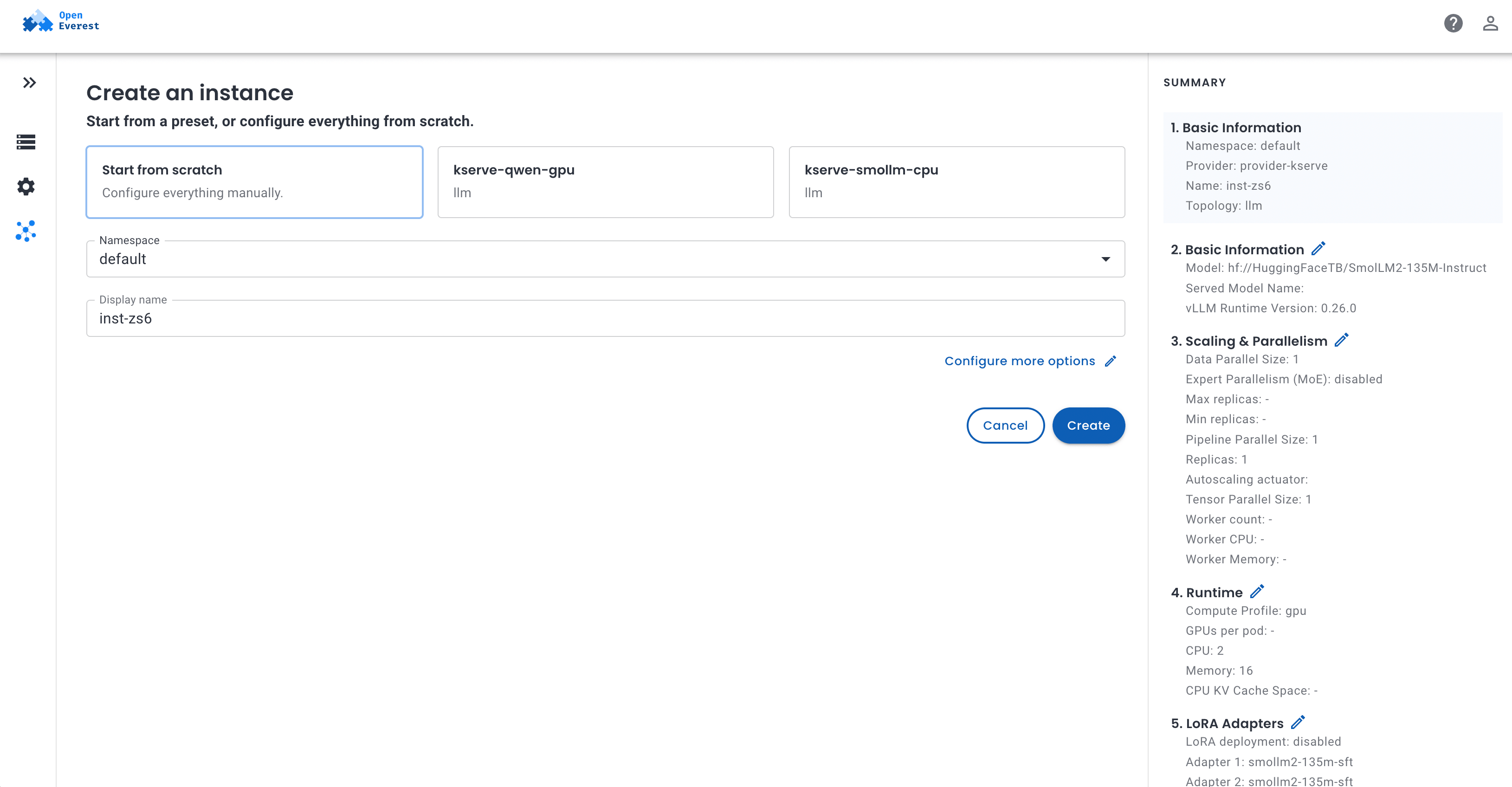
The provider registers itself in OpenEverest and shows up in the UI right away, together with two presets it ships out of the box: smollm-cpu for a quick smoke test without a GPU, and qwen-gpu with Qwen3-4B on a single GPU.
Step 4: HTTPS
API keys over plain HTTP are a bad idea, so the chart refuses to enable authentication without TLS (that is why we needed allowInsecureHTTP above). For a test, nip.io gives you a hostname without touching DNS: if the Gateway got 203.0.113.10, use 203-0-113-10.nip.io.
Create a Let’s Encrypt issuer that solves HTTP-01 challenges through the Gateway itself:
apiVersion: cert-manager.io/v1
kind: ClusterIssuer
metadata:
  name: letsencrypt-prod-ai-gateway
spec:
  acme:
    server: https://acme-v02.api.letsencrypt.org/directory
    privateKeySecretRef:
      name: letsencrypt-prod-ai-gateway-account
    solvers:
      - http01:
          gatewayHTTPRoute:
            parentRefs:
              - name: provider-kserve-ai-gateway
                namespace: provider-kserve
                kind: Gateway
                sectionName: acme-http01
A ClusterIssuer is cluster-wide, so it has no namespace - just kubectl apply -f it. The only namespace that matters is in parentRefs: it must point to where the Gateway lives (the provider release namespace, provider-kserve here).
Then turn TLS on in provider-values.yaml and upgrade - this time without allowInsecureHTTP:
aiGateway:
  enabled: true
  gatewayService:
    type: LoadBalancer
  tls:
    enabled: true
    hostname: 203-0-113-10.nip.io
    acmeHTTP01: true       # port-80 listener for ACME challenges only
    issuerRef:
      name: letsencrypt-prod-ai-gateway
      kind: ClusterIssuer
helm upgrade provider-kserve $CHART -n $NS -f provider-values.yaml
kubectl -n $NS wait certificate/provider-kserve-ai-gateway-tls --for=condition=Ready --timeout=10m

curl -s -o /dev/null -w '%{http_code}\n' https://203-0-113-10.nip.io/v1/models
401
401 is exactly what we want: the endpoint is up, and it does not talk to strangers. For wildcard certificates or clusters without public port 80, use DNS-01 - see ai-gateway-tls.md.
Step 5: Deploy a model
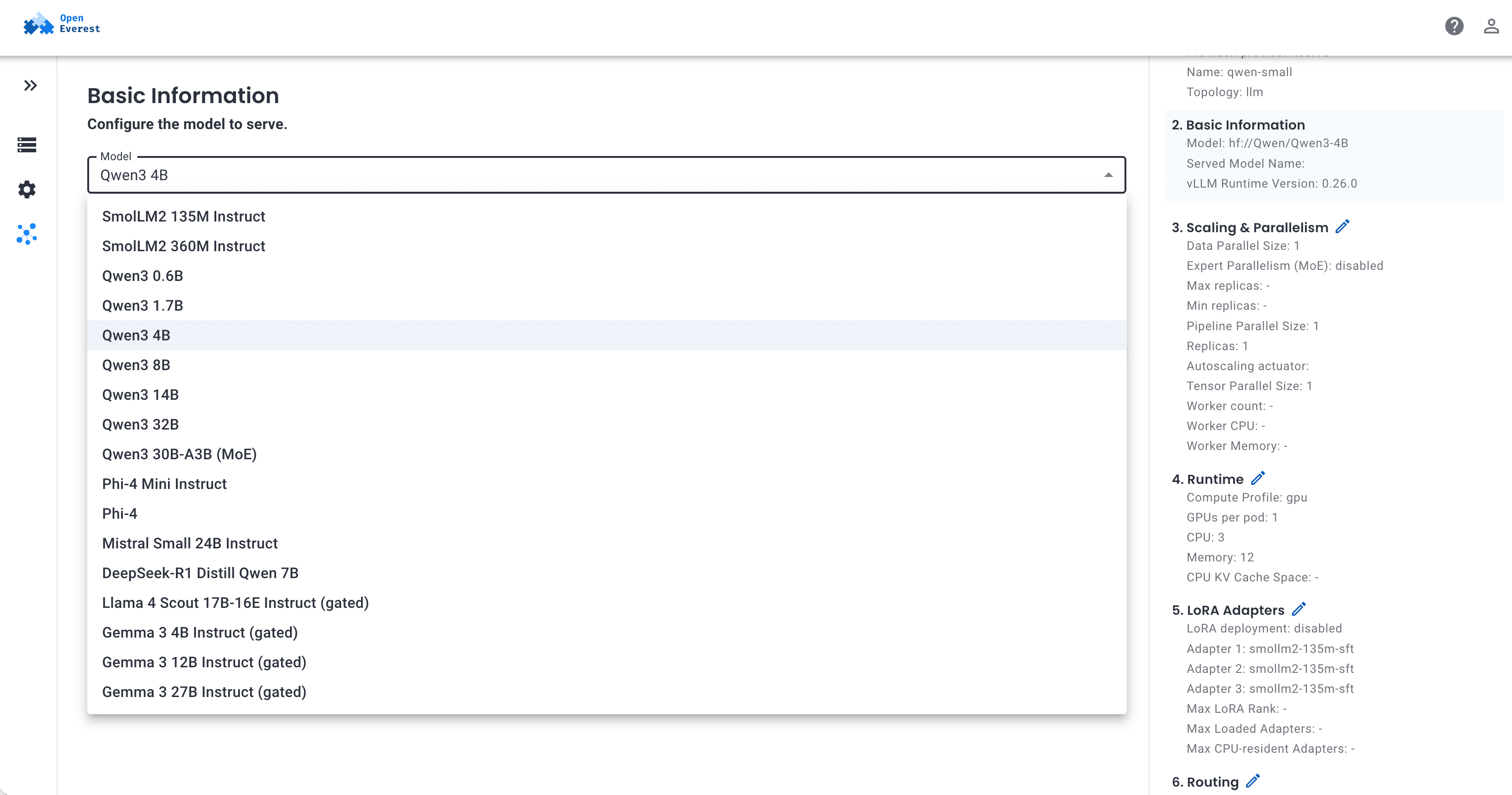
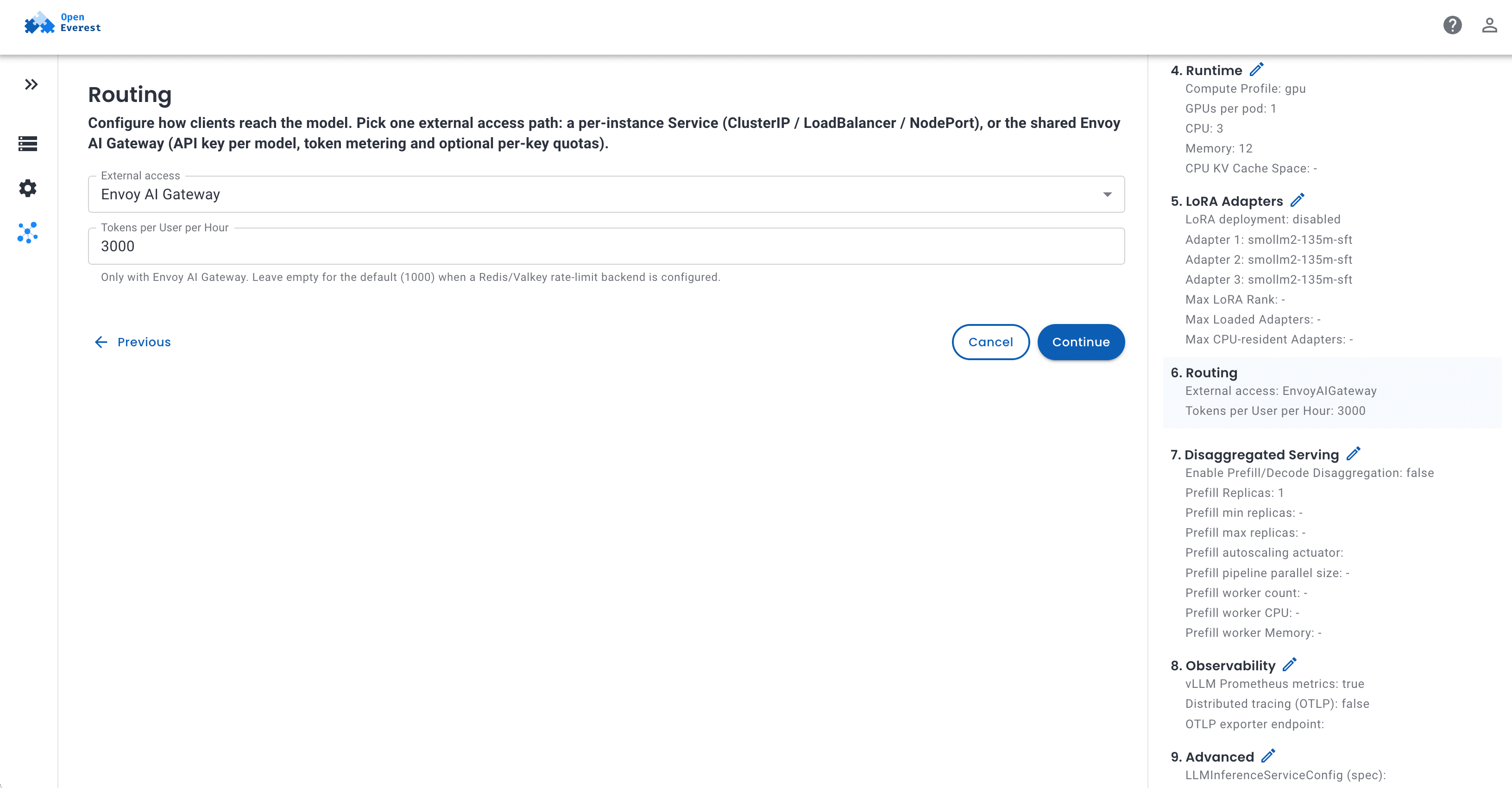
Now the fun part. In the UI, pick the qwen-gpu preset, or start from scratch and choose a model from the catalog. The form is generated from the provider definition and is split into sections: Basic Information, Scaling & Parallelism, Runtime, Routing, and a few advanced ones. In Routing, set External access to Envoy AI Gateway and, optionally, a token budget per user per hour.
If you prefer YAML (or GitOps), this is the whole thing:
apiVersion: core.openeverest.io/v1alpha1
kind: Instance
metadata:
  name: qwen-small
  namespace: default
spec:
  providerRef:
    name: provider-kserve
  topology:
    type: llm
    parameters:
      externalAccess: EnvoyAIGateway
      tokenLimitPerHour: 3000      # enforced only with Redis/Valkey configured
  components:
    llmEngine:
      type: vllm
      replicas: 1
      resources:
        requests: { cpu: "3", memory: 12Gi }
        limits: { memory: 12Gi }
      parameters:
        modelURI: hf://Qwen/Qwen3-4B
        modelName: qwen3-4b        # must be unique across the Gateway
        gpuCount: 1
$ kubectl -n default get instance qwen-small -w
The first start takes a few minutes: the vLLM image is large and the model is downloaded from Hugging Face. After that the Instance turns Ready.
Step 6: Call it
The provider generates a random API key per Instance and keeps it for the life of the Instance - just like a database password. Everything a client needs is in the connection details:
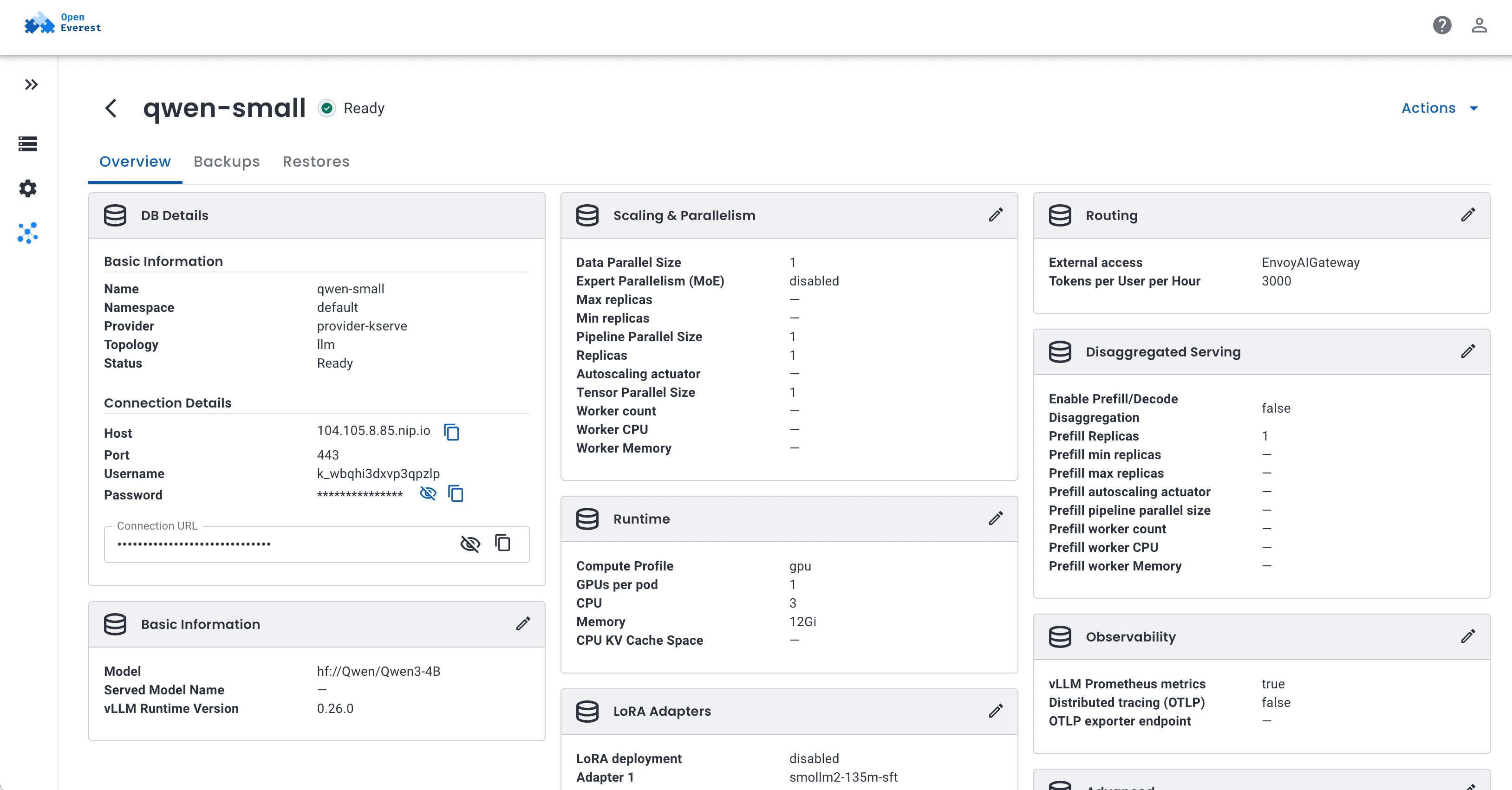
| Field | Content |
|---|---|
uri | https://<domain>/v1 - use as the OpenAI base_url |
password | the API key |
username | the key ID (not secret, appears in metrics) |
model | the name to send in the model field |
From the terminal, the same values live in the <instance>-conn Secret:
c() { kubectl -n default get secret qwen-small-conn -o jsonpath="{.data.$1}" | base64 -d; }

curl "$(c uri)/chat/completions" \
  -H 'Content-Type: application/json' \
  -H "Authorization: Bearer $(c password)" \
  -d "{\"model\":\"$(c model)\",\"messages\":[{\"role\":\"user\",\"content\":\"Hello\"}]}"
And since it is OpenAI-compatible, any SDK or tool that speaks OpenAI just works:
from openai import OpenAI

client = OpenAI(base_url="https://203-0-113-10.nip.io/v1", api_key="<password>")
resp = client.chat.completions.create(
    model="qwen3-4b",
    messages=[{"role": "user", "content": "Explain Kubernetes in one sentence."}],
)
print(resp.choices[0].message.content)
Anthropic-style clients can send the key in the x-api-key header instead.
Multi-tenancy for free
Deploy a second model - say llama-3.1-8b for another team - and it lands on the same Gateway, the same hostname, with its own key. Try calling it with the Qwen key and you get a 403. That is the whole multi-tenancy model: one endpoint, one key per model, and namespaces plus OpenEverest RBAC decide who can see which key.
A few operational things that come with it:
- Rotate a key:
kubectl -n team-a delete secret qwen-small-ai-gateway-key. A new key is generated within seconds, connection details update, and the old key stops working. - Token quotas: point the bundled Envoy Gateway at a Redis or Valkey (
envoy-gateway.config.envoyGateway.rateLimit.backend), andtokenLimitPerHouris enforced per key and model. Exhausted budgets return429. - Metrics: Gateway GenAI metrics carry an
openeverest_key_idlabel, so you can answer “who burned the GPU budget this week” with a single PromQL query.
When a model does not fit on one node
Small models are easy. The interesting part starts when one copy of a model is bigger than a single server - even after you split it across all GPUs in that server. It happens sooner than you think: Qwen3 14B is ~30 GB of bf16 weights, which already does not fit on a node with a single 20 GB card. Llama 4 Scout is ~220 GB - more than a whole 8x 24 GB box.
vLLM solves this with two kinds of parallelism, and the KServe provider exposes both:
| You set | What it means | Typical case |
|---|---|---|
tensorParallelSize | Split each layer across GPUs in one node | Fits on one 8-GPU box |
workerCount + pipelineParallelSize | Split the layers across several nodes (head + workers) | Still too big for one box |
replicas | How many full copies of that layout | More traffic |
Under the hood KServe runs a head + workers layout on a LeaderWorkerSet. The head is pipeline stage 0 and serves the API, workers hold the remaining layers and join the head over the pod network. Clients see nothing new - same URL, same model, same key.
Play with the planner to see how the pieces fit together:
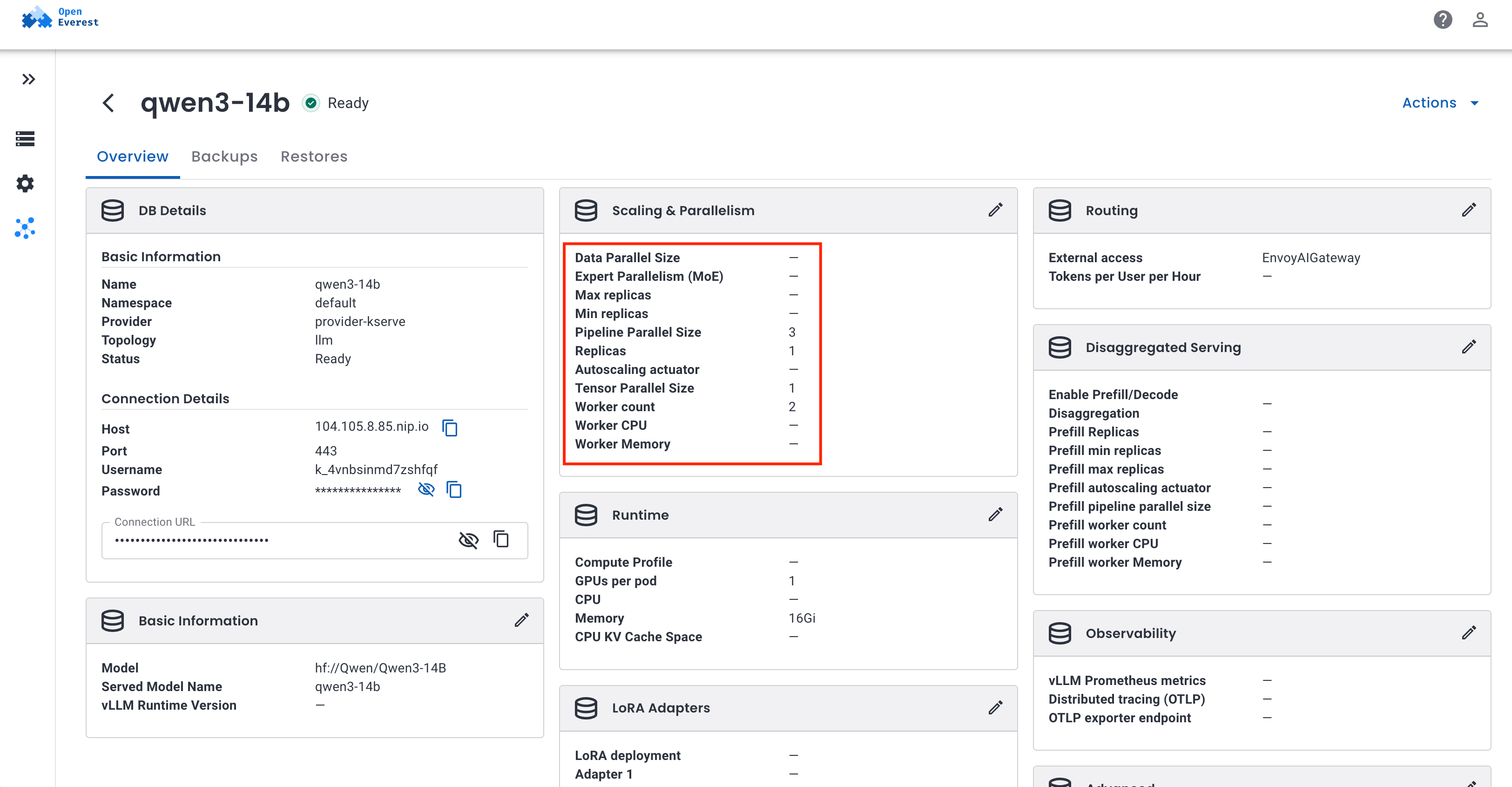
The default state of the planner is the setup I actually ran on the demo cluster: Qwen3 14B from the model catalog across three nodes with one 20 GB RTX 4000 Ada each. Its ~30 GB of bf16 weights do not fit on a single card. Split over two cards, the weights would fit, but there would be almost no memory left for the KV cache at Qwen3’s 40k-token context. Three nodes it is - head plus two workers, one pipeline stage each:
apiVersion: core.openeverest.io/v1alpha1
kind: Instance
metadata:
  name: qwen3-14b
spec:
  providerRef:
    name: provider-kserve
  topology:
    type: llm
    parameters:
      externalAccess: EnvoyAIGateway
  components:
    llmEngine:
      type: vllm
      replicas: 1
      resources:
        requests: { cpu: "3", memory: 16Gi }
        limits: { memory: 16Gi }
      parameters:
        modelURI: hf://Qwen/Qwen3-14B
        modelName: qwen3-14b
        gpuCount: 1               # per pod
        tensorParallelSize: 1
        pipelineParallelSize: 3   # must be workerCount + 1
        workerCount: 2
LeaderWorkerSet spreads the group across the GPU nodes - the head (-mn-0) and two workers (-mn-0-1, -mn-0-2):
$ kubectl get pods -o wide
NAME                                  READY   STATUS    AGE     NODE
qwen3-14b-kserve-mn-0                 1/1     Running   9m34s   lke664704-985021-mwh5d
qwen3-14b-kserve-mn-0-1               1/1     Running   9m34s   lke664704-985021-bd2pn
qwen3-14b-kserve-mn-0-2               1/1     Running   9m34s   lke664704-985021-vqpf4
qwen3-14b-kserve-router-scheduler-…   1/1     Running   9m34s   lke664704-985021-mwh5d
From kubectl apply to Ready took under ten minutes; most of it was every pod pulling the vLLM image and downloading the ~30 GB model in parallel. The vLLM logs show how the model got sliced - each GPU holds about a third of the weights, and the rest goes to the KV cache:
(Worker_PP0) Model loading took 9.46 GiB
(Worker_PP1) Model loading took 8.62 GiB
(Worker_PP2) Model loading took 9.46 GiB
(Worker_PP0) Available KV cache memory: 7.1 GiB
(EngineCore) GPU KV cache size: 143,104 tokens
(EngineCore) Maximum concurrency for 40,960 tokens per request: 3.49x
And for the client it is just another model behind the same Gateway, with its own API key. The only hint that three machines are answering is in the response fingerprint:
$ curl "$(c uri)/chat/completions" -H "Authorization: Bearer $(c password)" ...
{
  "model": "qwen3-14b",
  "choices": [{ "message": { "content": "Pipeline parallelism is a technique in distributed computing where different stages of a computational task are executed in parallel across multiple processors or devices..." } }],
  "system_fingerprint": "vllm-0.26.0-pp3-6fb39616",
  "usage": { "prompt_tokens": 22, "completion_tokens": 41, "total_tokens": 63 }
}
In the UI the same fields live in Scaling & Parallelism: Worker count, Pipeline Parallel Size, and optional worker CPU and memory.
A few things worth knowing before you go big:
workerCountis the switch.pipelineParallelSizealone only sets a vLLM flag - it does not create worker pods. The provider rejects an Instance wherepipelineParallelSizeis notworkerCount + 1, or where the GPU count is smaller thantensorParallelSize.- One replica is the whole ring.
replicas: 2means two heads and two sets of workers, not one extra GPU. - Every pod downloads the full model. Size
storageInitializermemory accordingly, or serve the weights from apvc://URI. - The ring lives and dies together. If any pod restarts, LeaderWorkerSet recreates the whole group. Pods also need to reach each other on the pod network (port 29501 and the NCCL ports).
For the full set of rules, including disaggregated prefill/decode with its own worker ring, see llm-multi-node.md.
What is next
What we built here is the core of a Model-as-a-Service platform: models on your own GPUs, one OpenAI-compatible endpoint, a key per model, quotas, metrics, and models bigger than a single server. All of it driven by the same Instance API and UI that OpenEverest users already use for databases.
The KServe provider is young and moving fast. Autoscaling with the Workload Variant Autoscaler, disaggregated prefill/decode, LoRA adapters and predictive models (sklearn, XGBoost, ONNX, Triton) are already in the provider - each of them deserves a separate post. If you want to try it, break it, or help shape it - the provider-kserve repository is the place to start, and we hang out in #openeverest-users on CNCF Slack.


 Solanica Team