OpenEverest introduces Presets - one click deployment
 Sergey Pronin, founder of Solanica and maintainer of OpenEverest (CNCF Sandbox)
OpenEverest had its v2.0.0-dev.3 release recently. It came with lots of various features, but I want to talk about just one - Presets. I see this feature as one of the most interesting ones for the OpenEverest community.
Presets are the templates of the instance or cluster. Users can now preconfigure all the configuration parameters, so that the deployment of a database, storage or LLM would be the single click of a button or a simple API call.
Before Presets, spinning up an Instance meant walking through every component by hand - replicas, storage, resources, backups, proxy, load balancer annotations, scheduling policy, and so on. It works, but it is repetitive and easy to get wrong, and there was no unified way to ship or share a known-good configuration. Presets fix exactly that.
See the full architecture spec of Presets in specs/006-preset.md.
How it works
Presets under the hood are the Custom Resources - InstancePreset. Their structure is similar to Instance CR, meaning you don’t need to learn the new concept.
$ kubectl get instancePresets
NAME               AGE
psmdb-replicaset   3m55s
psmdb-sharded      3m55s

$ kubectl get instancePresets psmdb-replicaset -o yaml
kind: InstancePreset
spec:
  components:
    engine:
      replicas: 3
      resources:
        limits:
          cpu: "1"
          memory: 4Gi
...
  deletionPolicy: Cascade
  providerRef:
    name: percona-server-mongodb
  topology:
    type: replicaSet
  version: 8.0.12
...
InstancePresets are cluster-wide resources, meaning they are not tied to a single namespace. You define a preset once and it is available across every namespace, so administrators don’t have to recreate the same template again and again.
Because they live at the cluster scope, presets deliberately leave namespace-scoped fields (like MonitoringConfig and Secret references) empty. When a preset is fetched for a specific namespace, OpenEverest resolves those fields from that namespace’s defaults - the same pattern Kubernetes uses to discover a default StorageClass via an annotation.
When a user picks a preset, OpenEverest copies its values into a brand new Instance and stamps it with the openeverest.io/instance-preset annotation. This keeps a trace of which preset the Instance originated from, while the Instance itself stays fully self-contained - editing or deleting the preset later does not affect already-running Instances.
The same data is available over the API, which is what powers the WebUI flow:
GET /clusters/{cluster}/instance-presets                                # List all presets
GET /clusters/{cluster}/instance-presets?provider={provider}            # Filter by provider
GET /clusters/{cluster}/instance-presets/{name}                         # Get a specific preset
GET /clusters/{cluster}/instance-presets/{name}/resolve?namespace={ns}  # Get a preset with namespace defaults pre-filled
See its full spec in the documentation.
Use cases
Providers to ease the onboarding. It is possible for Providers developers to ship built-in Presets during the installation. That way users are going to see the recommended configurations in the UI right away. We do that already for provider-percona-server-mongodb, which ships two presets out of the box - a replicaSet and a sharded MongoDB topology. Provider authors declare them right in the Helm chart’s values.yaml, so anyone installing the provider gets sensible defaults without any extra steps.
When deployed you will immediately see two presets in the UI:
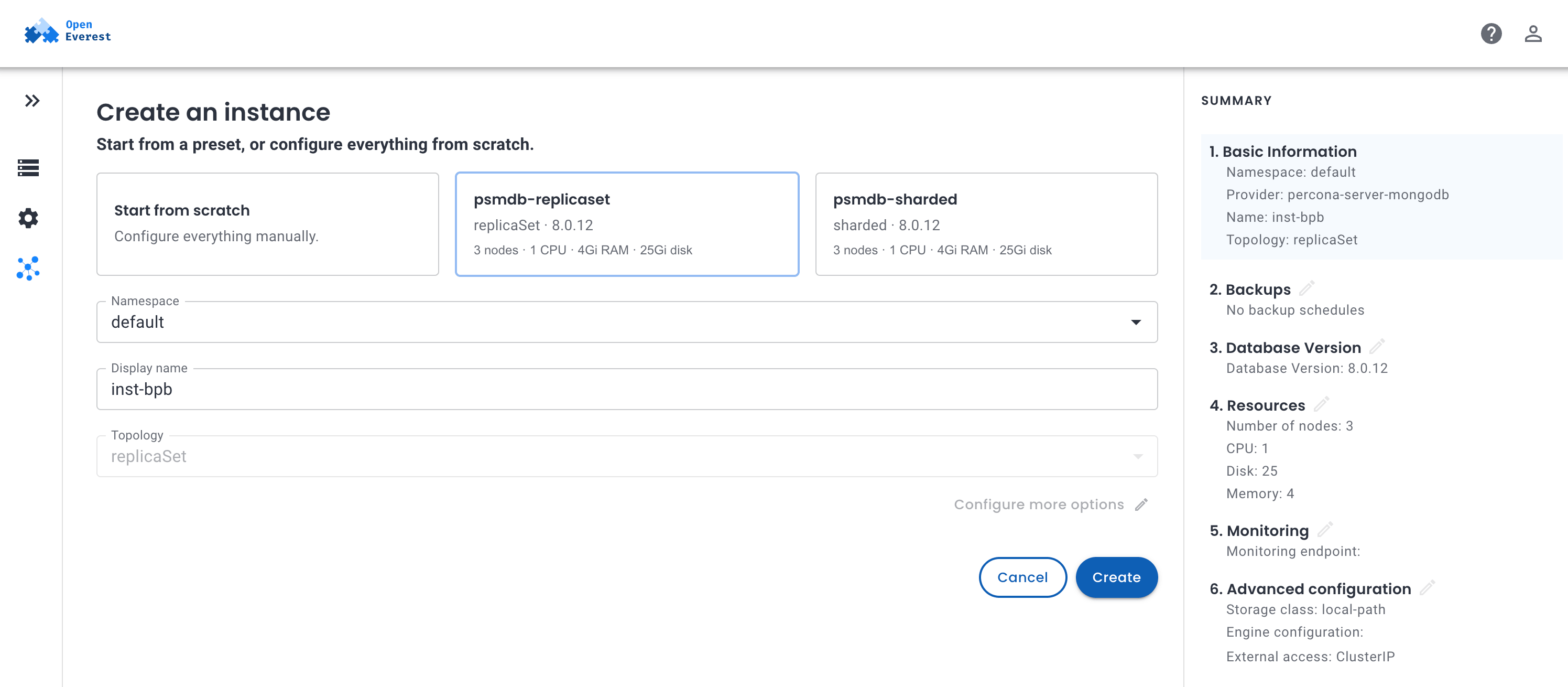
Instead of the old “configure everything from scratch” wall of forms, the user just picks psmdb-replicaset or psmdb-sharded, reviews the summary on the right, and clicks Create. Starting from scratch is still there for anyone who needs full control.
Administrators harness. If you are an administrator of OpenEverest and you want to standardize what kind of databases are deployed, their configurations, observability and security settings - you can now do it with Presets.
Presets also pair with RBAC. A new deploy permission sits just below the usual create permission: it lets a user launch an Instance from a preset, but not deviate from its defaults. So you can hand a team a curated set of presets and let them self-serve databases, while the platform still guarantees they follow the approved configuration. Any attempt to modify the spec away from the preset is rejected server-side.
What is next
What shipped in dev.3 is Phase 1: one-click deployment from pre-configured presets. Right now users can only view and select presets in the WebUI, and the form is a read-only preview.
Phase 2 is where it gets more powerful. We will soon expand this feature and allow users to edit presets before deploying, create new presets from an already running Instance, and customize presets from scratch. Administrators will be able to manage presets directly in the UI and control which presets are visible to which teams.
If you want to help - please see this GitHub issue: https://github.com/openeverest/openeverest/issues/1820