Redis to Valkey Migration on Kubernetes with RedisShake and OpenEverest
 Sergey Pronin, founder of Solanica and maintainer of OpenEverest (CNCF Sandbox)
Since Redis changed its license in 2024, “should we move to Valkey?” has become a regular question in platform teams. Valkey is the community fork of Redis 7.2 under the Linux Foundation, still BSD-licensed and wire-compatible, and it has kept improving. The decision is usually easy. Moving the data is the part people put off, because a Redis that matters is a Redis that is taking writes right now.
The migrations plugin for OpenEverest now has an engine for exactly this: Redis or Valkey → Valkey. You point it at a running Redis (standalone or cluster, inside or outside Kubernetes), pick a Valkey instance managed by OpenEverest as the target, and it copies the data, keeps the target in sync while your application keeps writing, and switches over when you say so.
This post explains how it works and what happened when we ran it on two large datasets, at sizes you would actually worry about.
TL;DR
We migrated two Redis 7.2 clusters into Valkey 9.0 on Kubernetes while an application wrote 2,000 changes per second to the source. Then we compared every key on both sides.
| Run A: big values | Run B: many keys | |
|---|---|---|
| Data on Redis | 50.2 GiB, 47.0M keys of 6 types | 20.5 GiB, 150M small strings |
| From “Create” to in sync | 11.1 min | 23.5 min |
| Writes to the source during the migration | 2.31M | 3.14M |
| Cutover | 20 s | 56 s |
| Keys compared | 47,014,200 | 150,316,491 |
| Missing or different on Valkey | 0 | 0 |
| TTLs preserved | 29.1M, within 0.55 s | 30.3M, within 0.18 s |
| Memory, Redis → Valkey | 50.5 → 45.7 GiB (-9.5%) | 20.6 → 16.4 GiB (-20%) |
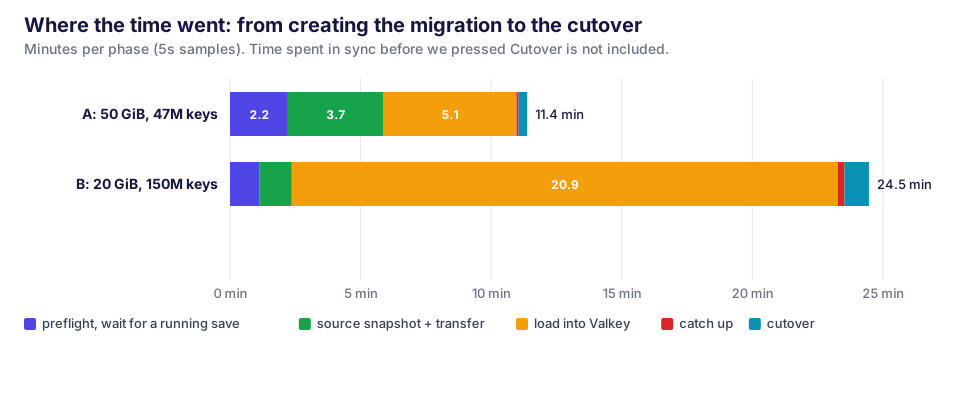
Key count drives the timing more than size does: 150M small keys took twice as long as 50 GiB of larger ones. The source’s memory hardly moved. The rest of this post covers how it works and a few things worth knowing before you run your own.
How it works
The plugin adds a Migrations page to OpenEverest. Each migration gets one worker pod. The worker runs a small Go agent that drives an unmodified RedisShake 4.7 binary, Alibaba’s open-source Redis data mover. RedisShake does the heavy lifting. The agent decides when RedisShake runs and checks what it did.
A migration goes through five steps:
- Preflight. The agent checks both sides and reports every problem at once, not one at a time. The source must be a primary, keys must live only in database 0, both clusters must be healthy, the target must be empty (or you ticked Delete all keys on the target), and source and target must be different servers. There’s also one check that exists only because Redis and Valkey have started to drift apart. Hashes with per-field expiration can’t be moved from Redis 8 to Valkey 9 yet, so they are caught here, not halfway through the copy.
- Snapshot. RedisShake connects to every source primary as if it were a replica (
PSYNC). The source takes a snapshot exactly as it would for a new replica and sends it over. RedisShake loads it into Valkey, routing every key to the right target shard. This works when the source and target have different shard counts, and from a standalone Redis into a cluster. - Replication. Everything written to the source after the snapshot arrives as the normal replication stream and is applied to the target. A small Lua filter inside RedisShake splits multi-key commands such as
MSETandDELwhose keys land in different target slots. It also skips key prefixes you excluded, and it stops the migration instead of silently dropping a command the target can’t run. - Lag and cutover. Every 5 seconds the agent writes a heartbeat key on the source, one for each pair of source and target shards that share slots. RedisShake sends each pair’s changes over one ordered connection. So when a heartbeat shows up on the target, everything written before it in that pair has been applied too. The lag is simply the age of the oldest heartbeat that hasn’t arrived yet. At cutover the agent writes one final heartbeat into every pair and waits until all of them land. Every change made before you pressed Cutover is then on Valkey, even if the source is still taking writes. After that it stops RedisShake and cleans up its keys on both sides.
- Delete. Removes the worker, its Secret and the migration’s state key. The data stays on Valkey.
The migration’s own state is a key on the target, not something in the worker’s memory, so a restarted worker knows where it was. One limitation you should know up front: RedisShake can’t resume a copy. If a migration is interrupted (lost connection, source failover, worker restart), the agent empties the target and starts the copy again. It does this up to 5 times in a row before giving up. For the same reason, migrations of this type can’t be paused.
Not copied: ACL users, server configuration and Pub/Sub messages (they aren’t data). Data types from Redis modules can’t be restored into Valkey either.
The test setup
Everything ran on one managed Kubernetes cluster on Linode (LKE).
- Source: Redis 7.2.17 in cluster mode, 3 primaries, deployed as a plain StatefulSet outside OpenEverest, the way a lot of “legacy” Redis runs today. Password auth, a 24 GiB limit per pod, and Redis’ default save points (
3600 1 300 100 60 10000) so it snapshots to disk like most production setups. - Target: an OpenEverest
Instancerunning Valkey 9.0.6, 3 shards with TLS and client certificates (the provider’s defaults), 26 GiB per pod. We ran the target without replicas so both clusters fit on three 64 GB nodes. - Worker: the
redis-shakeengine from the plugin’s main branch, scheduled on a separate 8 vCPU / 16 GB node. We raised its memory limit from the chart’s 4 GiB to 8 GiB just in case. In run B, where we recorded it throughout, it never used more than 0.4 GiB. - Application: a client writing 2,000 changes per second to the source for the whole migration: new sessions with TTLs, overwrites,
HSET,INCR,LPUSH,ZINCRBY,XADD,DEL,EXPIRE, plus short-lived keys with a 20-second TTL. We stopped it right before the cutover, as you would when you repoint an application. - Verification: after the cutover, a tool walked every key on the source and compared it with Valkey: type, full value, and expiry time (
PEXPIRETIME). Values were compared in a canonical form: hash fields and set members sorted, sorted sets with their scores, and stream entries plus each consumer group’s pending count and last delivered ID.
The target was a normal OpenEverest instance:
apiVersion: core.openeverest.io/v1alpha1
kind: Instance
metadata:
  name: shop-valkey
  namespace: valkey-shop
spec:
  providerRef:
    name: valkey
  version: "9.0"
  topology:
    type: cluster
    parameters:
      numShards: 3
  components:
    engine:
      type: valkey
      replicas: 0
      resources:
        requests: {cpu: "3", memory: 26Gi}
        limits: {memory: 26Gi}
      storage:
        size: 60Gi
The manifests, the load generator, the verifier and the raw metrics are in blog-data.
Run A: 50 GiB of realistic data
The first dataset looked like a busy web application’s Redis:
- 28.5M session strings (JSON, 0.4-1.6 KB, TTL of 7-30 days)
- 10M user profiles as 10-field hashes
- 1M activity feeds as 40-item lists
- 2M tag sets
- 5M counters
- 20 leaderboards: sorted sets with 1M members each
- 200 event streams with 50k entries each, two consumer groups, and 2,000 unacknowledged entries per stream
That came to 50.2 GiB in memory and 36 GB of RDB across the three shards.
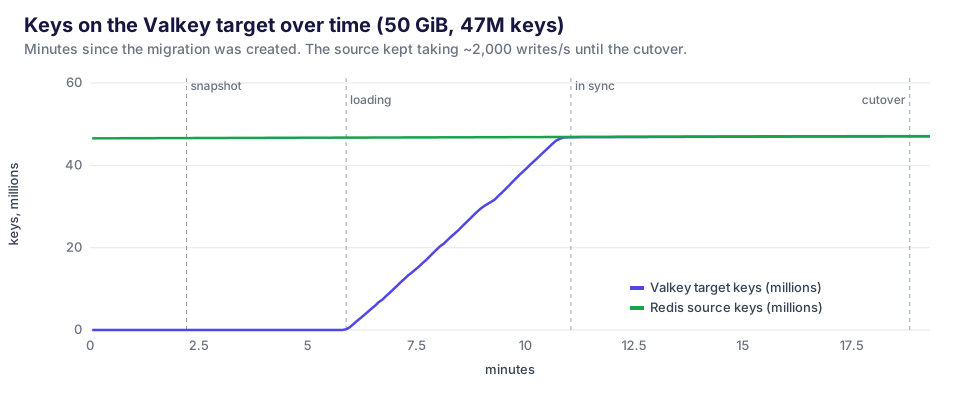
From pressing Create to “in sync” took 11 minutes:
- 0-2.2 min: preflight, then waiting. The application was writing, so Redis’ default
save 60 10000rule had already started a regular background save. RedisShake waits for a running save to finish before it asks for its own snapshot. - 2.2-5.9 min: the snapshot. Redis forked, wrote a 12 GB RDB per shard (about 2 minutes), and sent it to the worker (about 1.5 minutes).
- 5.9-11.0 min: loading. RedisShake wrote all 46.8M keys into Valkey at around 153k keys per second, peaking at 186k operations per second on the target.
- 11.0-11.1 min: catch-up. Changes made during those 11 minutes reached the target within seconds.
We left it replicating for another 8 minutes. The lag stayed at 0, and the 2,000 writes per second kept arriving.
The cutover took 20 seconds. Afterwards the verifier found all 47,014,200 live keys on Valkey with identical values, including every leaderboard member and score and every stream’s consumer groups and pending entries. 29.1M keys had a TTL. None lost it, and the expiry times on Valkey were within 0.55 seconds of the source (20 ms on average).
What the migration costs the source
The question we get most is whether a migration puts a production Redis at risk. Here’s the source during run A:
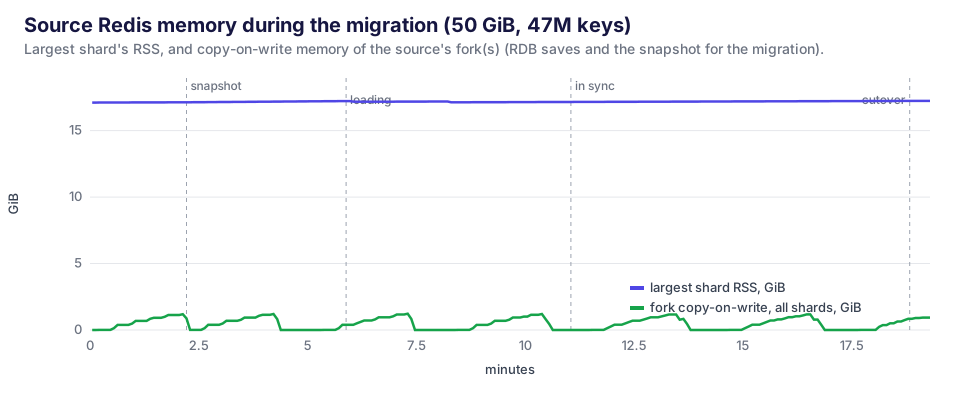
The largest shard sat at about 17 GiB the whole time. The copy-on-write spikes, at most 1.26 GiB across all three shards, come from forks. With default save points and steady writes, Redis forked every few minutes anyway. The migration’s snapshot was one more fork of the same kind. On the network side, the source sends each shard’s RDB once, then a replication stream as big as your write traffic. If your Redis already survives its own BGSAVE and adding a replica, it will survive this.
Run B: 150 million keys
The second dataset is the worst case for per-key overhead: 150M small strings (14-byte keys, 32-64-byte values), a fifth of them with a TTL. That’s only 20.5 GiB in memory, but three times as many keys as run A.
This run also tested the Delete all keys on the target option. The target still held run A’s 47M keys, and the migration emptied it in under 20 seconds before copying.
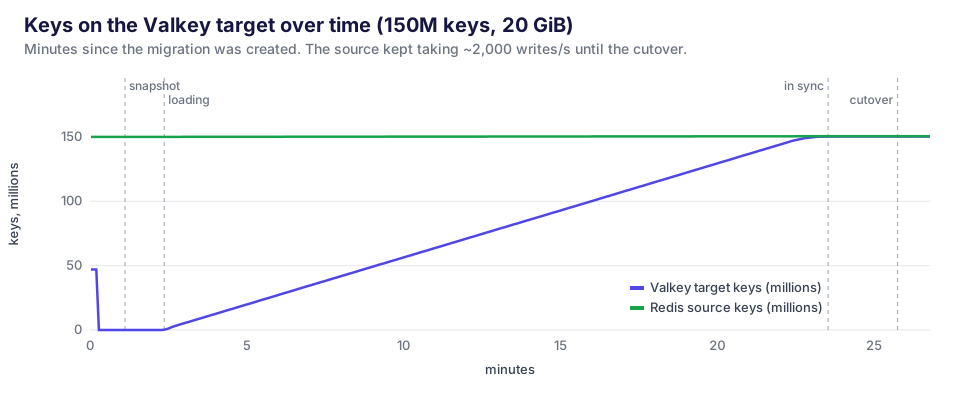
The snapshot was quick, because the RDB was only 10 GB. Loading took 21 minutes at about 120k keys per second. The migration was in sync after 23.5 minutes. The verifier then compared all 150,316,491 keys: none missing, none different, and all 30.3M TTLs present and within 0.18 seconds.
The cutover took 56 seconds, longer than in run A. RedisShake itself had stopped 3 seconds after the request, once the final heartbeats arrived. The rest went to cleanup, which looks for the heartbeat keys with SCAN over the whole keyspace on every primary, and that takes longer the more keys you have. The heartbeat key names are deterministic, so the cleanup could delete them directly. That’s an easy improvement for a future release. Deleting the migration runs the same scan, so it took 50 seconds too. Your application doesn’t have to wait for either: once RedisShake has stopped, nothing more is copied to Valkey.
The same data takes less memory on Valkey
Because both sides held the same keys just before the cutover, we could compare memory use directly:
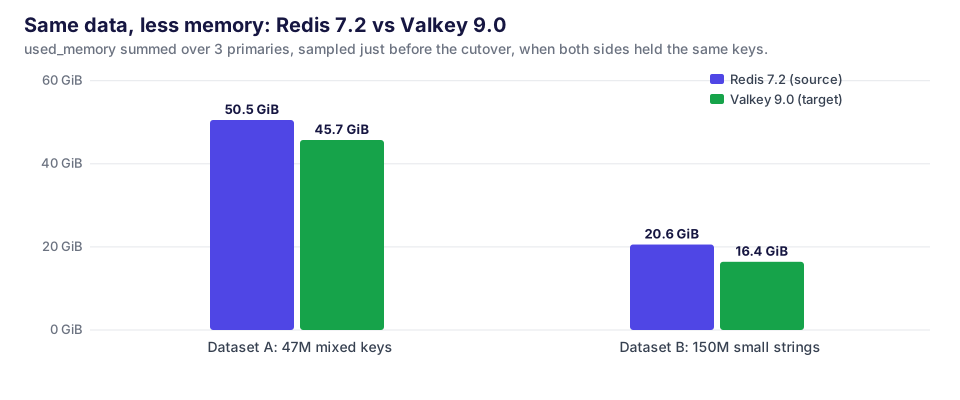
Valkey 9.0 needed 9.5% less memory than Redis 7.2 for the mixed dataset and 20% less for 150M small keys. This lines up with the Valkey 8.x rework of how keys are stored in the main key table. It saves a roughly fixed number of bytes per key, so it matters most when keys are small and numerous. For many teams that difference alone pays for the migration.
Things worth knowing before you migrate
- Estimate by key count, not by gigabytes. Loading ran at roughly 120-150k keys per second in our setup. 150M small keys took twice as long as 50 GiB of large ones.
- The source needs room for one more snapshot. In our runs Redis wrote the RDB to its own disk before sending it (12 GB per shard in run A). Make sure the disk has that space. A save that is already running delays the start; that was the first 2 minutes of run A.
- The worker keeps the snapshot on its node’s disk until it’s loaded (9.5 GiB peak in run B; run A’s snapshots were 36 GB). Schedule it on a node with that much free ephemeral storage. While loading it used up to 5.4 CPU cores, and its memory stayed under 0.4 GiB.
- The lag looks huge until the snapshot is loaded. Heartbeats written during the copy wait behind the snapshot. The reported lag climbed to 515 s in run A and 1,309 s in run B, then fell to 0 within seconds once loading finished. That’s expected.
- Don’t validate with
DBSIZE. Redis 7.2 frees expired keys lazily, so with millions of long-TTL keys around, our 20-second keys stayed counted long after they expired. The counts differed by tens of thousands until something touched those keys. WhenSCANtouched them, Redis dropped 35k of them on one shard. Once expired keys were dropped on both sides, the counts matched exactly in both runs: the source’s keys plus the migration’s one state key. Compare keys, not counters. - An interruption means a full copy again. If you’re migrating hundreds of gigabytes over an unreliable link, plan for that, or make sure the source’s
client-output-buffer-limit replicaandrepl-timeoutallow a long copy. - Check what can’t move. That means keys outside database 0, data types from Redis modules, and hashes with per-field TTLs if you’re coming from Redis 8. ACL users and configuration need to be recreated on the Valkey side. OpenEverest manages the default user and TLS for you.
Running your own
Create a Valkey instance in OpenEverest, sized for your data (remember it may need less memory than Redis did).
Open Migrations → New migration and choose Redis / Valkey → Valkey.
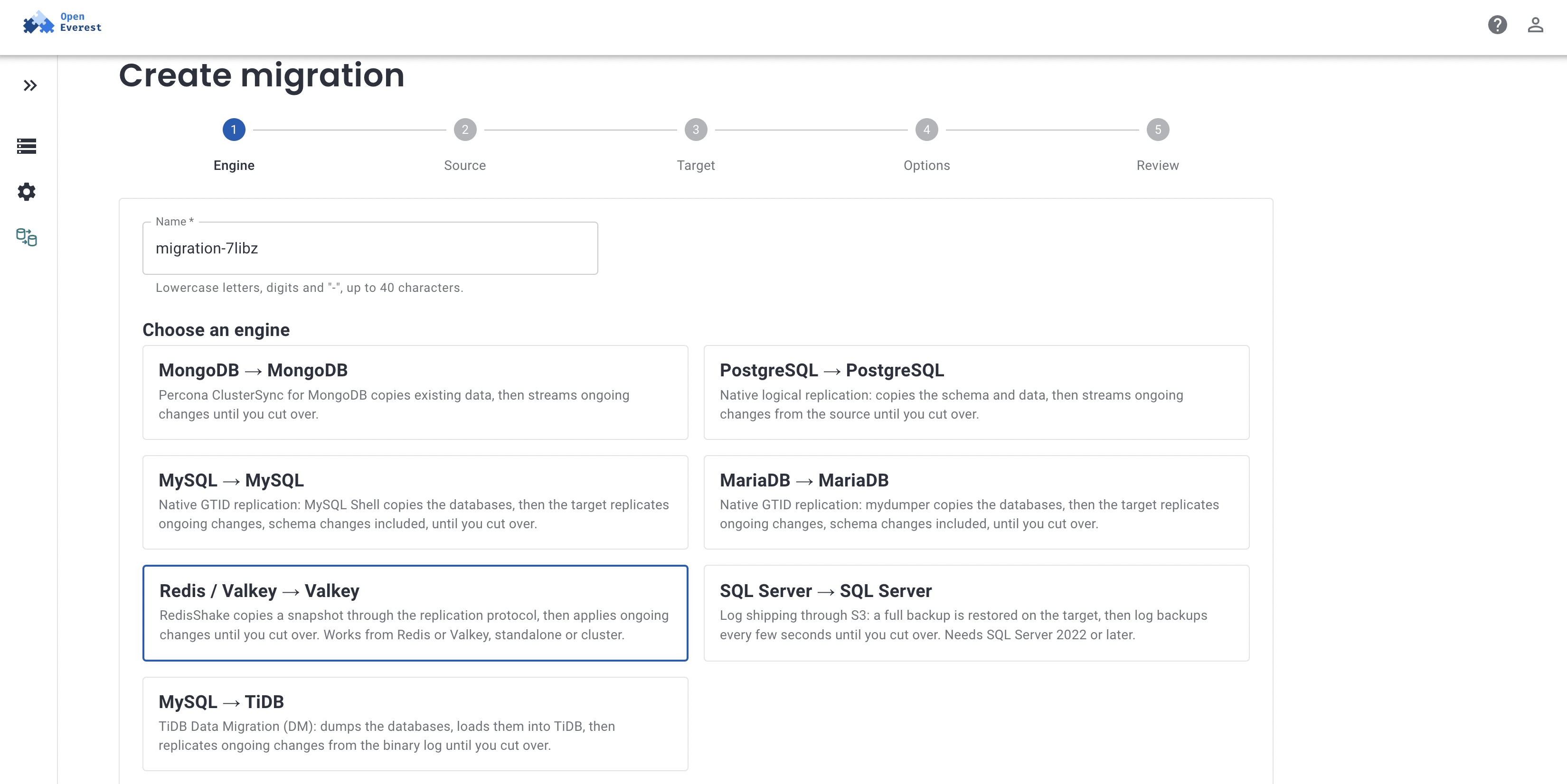
For the source, either pick an OpenEverest instance or enter a URI such as
redis://default:password@redis-0.redis:6379(rediss://for TLS, with an optional CA). For a cluster, any primary will do. The user needsPSYNCand permission to write the heartbeat key.Pick the target instance, optionally list key prefixes to skip (caches you’d rather rebuild), and create the migration.
Watch it go through Copying data, Catching up with changes made during the copy, and Replicating changes. Once the lag is near zero, Cutover becomes available.
Stop writes on the source, press Cutover, and point your application at Valkey when the migration shows Completed. Delete the migration to clean up.
Wrapping up
Migrating Redis to Valkey is a well-understood problem: Valkey speaks the same replication protocol, and RedisShake already knows how to use it. What the plugin adds is the work around it: checking both sides before anything moves, keeping state where a restart can find it, measuring lag honestly, and a cutover you can trust while the source is still busy. On a 50 GiB cluster and a 150-million-key one, that came down to 11 and 24 minutes, a short cutover, and not a single key out of place.
The plugin is open source in openeverest/plugin-migrations, alongside engines for MongoDB, PostgreSQL, MySQL, MariaDB, SQL Server and MySQL → TiDB. Valkey on OpenEverest comes from provider-valkey.
Try it yourself
If you’re planning a move from Redis to Valkey and want to talk through your data, topology or cutover window, book a call with our team. We’re happy to run a migration like these against a copy of your own data.