
Sovereign S3: What It Means and How to Build It on Your Own Infrastructure
 Sergey Pronin, founder of Solanica and maintainer of OpenEverest (CNCF Sandbox)
In June 2025, a Microsoft France executive told the French Senate that Microsoft cannot guarantee that French customer data will never be handed to US authorities. Not because of a bug. Because of the US CLOUD Act. The data sat in a European data center the whole time.
Eight months later, in February 2026, MinIO archived its community repository. The default “run S3 yourself” answer for a whole generation of Kubernetes platforms became read-only.
Those two events capture the problem. Putting your bytes in the right region is not sovereignty. Running somebody else’s binary that can disappear tomorrow is not sovereignty either. This post breaks down what sovereign S3 actually requires, and then builds one end to end on a real Kubernetes cluster.
What “sovereign S3” actually means
Most “sovereign cloud” marketing reduces sovereignty to data residency: pick an EU region, done. For object storage - the place where your backups, data lakes, AI datasets and logs end up - you need four things.
| Pillar | The question to ask | Fails when… |
|---|---|---|
| Jurisdiction | Whose law can compel access to the data? | The operator is subject to foreign law (CLOUD Act), regardless of where the disks are |
| Control | Who holds the keys and decides who gets in? | Access keys, IAM and encryption are managed by a third party you cannot audit |
| Software freedom | Can you keep running, patching and forking the software forever? | The license is restrictive, or the vendor stops shipping binaries and features |
| Portability | Can you leave - with your data - without a penalty? | Proprietary APIs, or egress fees that turn your data into a hostage |
The S3 API itself is the good news here. It is the de facto standard: every backup tool, database operator, data lake engine and ML framework speaks it. That means the storage behind the API can be swapped - which is exactly what makes a sovereign S3 achievable.
Why this became urgent
The legal ground moved.
- The EU Data Act has applied since 12 September 2025. Cloud providers may only charge cost-based switching and data egress fees when you move to another provider, and from 12 January 2027 those fees are banned entirely. Regulators are explicitly pushing for portability.
- DORA has applied to EU financial entities since 17 January 2025, with strict requirements on ICT third-party risk and exit strategies. “Our backups live with one hyperscaler” is a concentration risk you now have to justify.
- The EU-US Data Privacy Framework survived its first court challenge in September 2025, but an appeal is possible. Its predecessors, Safe Harbor and Privacy Shield, were both struck down. Building on a legal framework with that track record is a bet.
The open source ground moved.
MinIO was the default self-hosted S3 for years. Then, step by step:
- 2021 - relicensed from Apache 2.0 to AGPLv3.
- 2025 - the admin web console was stripped from the community edition. Management moved to the commercial AIStor product.
- December 2025 - the community edition went into “maintenance mode”.
- February 2026 - the
minio/miniorepository was marked as no longer maintained and archived.
If your platform depends on MinIO today, you are running unmaintained software. There are community forks, but “which fork survives?” is not a question you want to answer for your storage layer. We compared the alternatives in 4 MinIO Alternatives; in this post we go deep on the one we picked.
Why SeaweedFS
SeaweedFS checks the “software freedom” pillar by design:
- Apache 2.0 license. No copyleft trap, no license change surprises for your SaaS.
- Healthy and active. ~35,000 GitHub stars, and releases ship often - v4.51 came out on 25 October 2026.
- One binary, full S3 surface. The same
weedbinary provides the S3 gateway, a POSIX-like filer, IAM and an admin UI. No separate “enterprise” build for basic features. - Built for lots of small objects. SeaweedFS packs objects into large volume files, so billions of small files (logs, database backup chunks, ML samples) do not turn into a disk-seek nightmare.
Running it by hand is another story. A production SeaweedFS has masters (Raft quorum), volume servers, filers (metadata) and S3 gateways - each with its own scaling, storage, TLS and failure modes. That is why we use the SeaweedFS operator and the OpenEverest SeaweedFS provider, whose v0.2.0 release focuses on exactly the production basics.
The provider is developed in the open as part of OpenEverest’s LFX Mentorship program under the Linux Foundation. Aditya Pimpalkar is the mentee and the provider’s main maintainer, mentored by Diogo Recharte and Sergey Pronin. The work does not stop at the provider: Aditya also contributed native HTTPS for the S3 gateway to the upstream SeaweedFS operator. Fittingly for a post about sovereignty, the code is built by a community, not owned by a vendor.
Hands-on: building a sovereign S3 on Kubernetes
Everything below is plain Kubernetes, so it runs the same on bare metal, a local cloud provider, or an air-gapped data center. That is the point.
Prerequisites
- OpenEverest v2 installed in the cluster.
- cert-manager for internal mTLS certificates.
- Optional: the Prometheus Operator (e.g. kube-prometheus-stack) and the OpenEverest Metrics plugin for metrics.
1. Install the SeaweedFS provider
The provider chart bundles the SeaweedFS operator:
helm install provider-seaweedfs \
  oci://ghcr.io/openeverest/charts/provider-seaweedfs \
  --version 0.2.0 \
  --namespace everest-system
2. Describe the storage you want
One Instance resource describes the whole cluster: three masters for Raft quorum, three volume servers, two filers so metadata survives a node failure, and two S3 gateways.
apiVersion: core.openeverest.io/v1alpha1
kind: Instance
metadata:
  name: sovereign-s3
spec:
  providerRef:
    name: provider-seaweedfs
  topology:
    type: standalone
    parameters:
      replication: "001"      # every object stored twice, on different servers
      tls:
        enabled: true          # mTLS between all SeaweedFS components
      metrics:
        prometheus:
          enabled: true        # PodMonitor for the Prometheus Operator
  components:
    master:
      type: seaweedfs
      version: "4.48"
      image: chrislusf/seaweedfs:4.48
      replicas: 3
    volume:
      type: seaweedfs
      replicas: 3
      storage:
        size: 20Gi
    filer:
      type: seaweedfs
      replicas: 2
      storage:
        size: 10Gi
    s3:
      type: seaweedfs
      replicas: 2
kubectl apply -f sovereign-s3.yaml
kubectl get instance sovereign-s3 -w
Prefer clicking to YAML? The OpenEverest UI creates the same instance with a wizard, one step per component. Leave Max volumes per disk empty and the volume servers size their slots from the disk (more on that in Sizing).
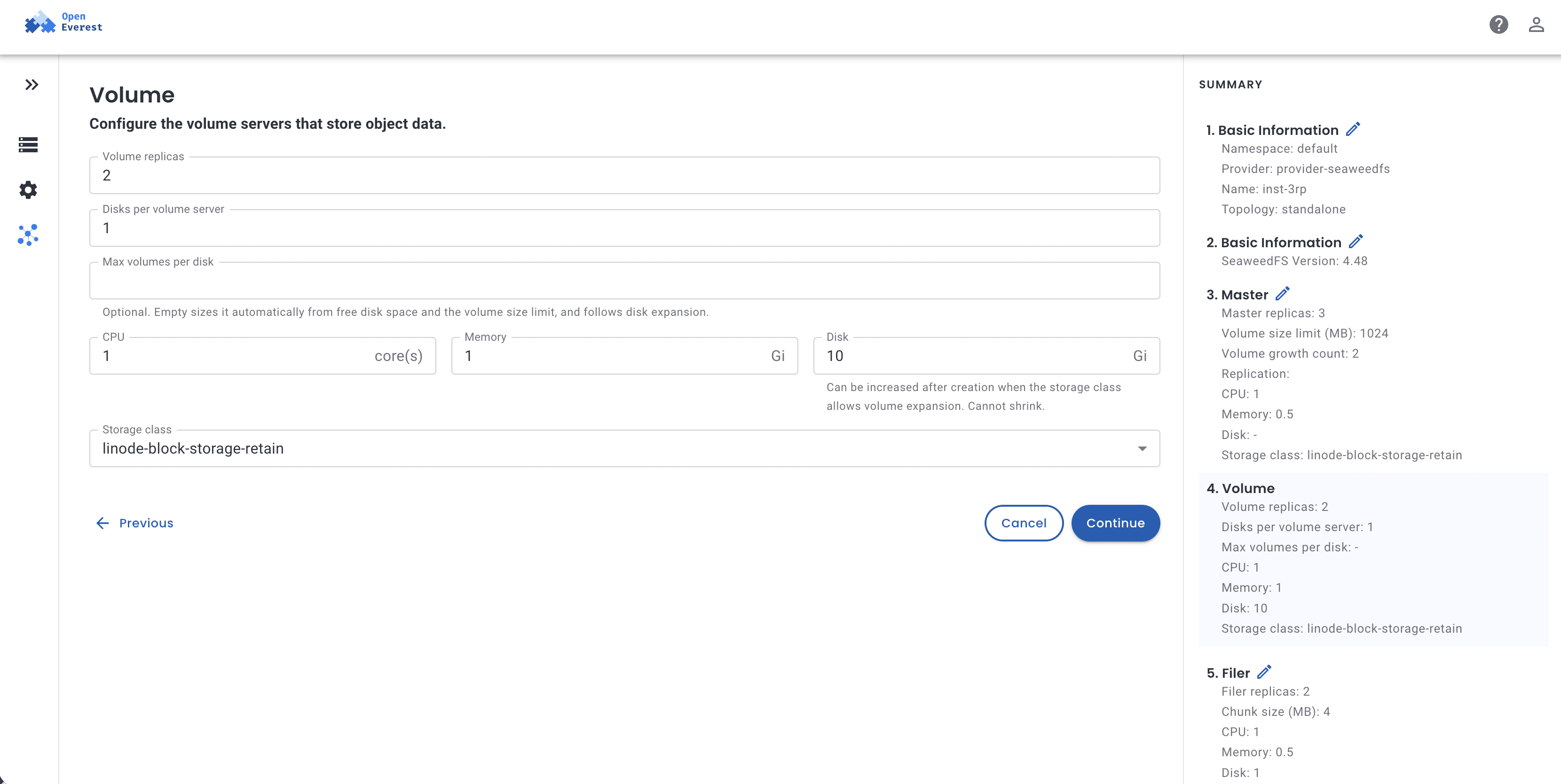
On our cluster, the instance went from Initializing to Ready in under three minutes. Here is what you get out of the box, mapped to the sovereignty pillars:
| What v0.2.0 configures | Pillar |
|---|---|
| S3 authentication always on, with generated access keys stored only in your cluster’s Secrets | Control |
| mTLS between masters, volume servers, filers and gateways, with certificates from your own cert-manager | Control |
Data written twice (001 replication), pods spread across nodes, a PodDisruptionBudget per component | Availability (a sovereign system you cannot keep online is not much use) |
| Volume slots sized from the disk automatically, online storage expansion, Prometheus metrics | Operations you own, not a support ticket |
| Standard S3 API | Portability |
3. Verify that nobody gets in without keys
The provider publishes connection details in a Secret named sovereign-s3-conn, including AWS_ACCESS_KEY_ID and AWS_SECRET_ACCESS_KEY, so any pod can consume it with envFrom. From a pod in the cluster:
$ curl -s -o /dev/null -w "%{http_code}\n" http://sovereign-s3-s3.default.svc:8333/
403

$ AWS_ACCESS_KEY_ID=x AWS_SECRET_ACCESS_KEY=y \
  aws --endpoint-url http://sovereign-s3-s3.default.svc:8333 s3 ls
aws: [ERROR]: An error occurred (InvalidAccessKeyId) when calling the ListBuckets operation:
The access key ID you provided does not exist in our records.
Anonymous and unknown clients are rejected from the very first boot. With the real keys, any S3 client just works:
$ aws --endpoint-url http://sovereign-s3-s3.default.svc:8333 s3 mb s3://sovereign-demo
$ aws --endpoint-url http://sovereign-s3-s3.default.svc:8333 s3 cp hello.txt s3://sovereign-demo/
$ aws --endpoint-url http://sovereign-s3-s3.default.svc:8333 s3 cp s3://sovereign-demo/hello.txt -
hello-sovereign
Internal mTLS is not decorative either. Even an admin weed shell inside a master pod cannot talk to the cluster until it loads the client certificates:
kubectl exec sovereign-s3-master-0 -- sh -c \
  'echo "volume.list" | weed -config_dir=/etc/sw-security shell \
   -master=sovereign-s3-master-0.sovereign-s3-master-peer.default:9333'
Its output confirms that every volume is stored with ReplicaPlacement:001 - two copies on two different volume servers.
To rotate the keys, edit them in the sovereign-s3-s3-config Secret; the gateways roll and pick them up. You can also bring your own keys by creating that Secret before the instance.
4. Sizing: how many buckets fit
SeaweedFS stores objects in volumes (up to 1 GiB each with the provider’s default), and every bucket gets its own volumes. Each volume copy takes a slot on a volume server. When the slots run out, new buckets cannot get a volume, and uploads to them fail with InternalError.
We hit exactly that while writing this post. With the earlier defaults (8 slots per server, and 12 slots claimed by every new bucket), our 3 × 20 GiB cluster accepted writes to a single bucket. A MongoDB backup pointed at the next bucket failed. So we fixed the defaults before shipping v0.2.0:
- Slots follow the disk. Each volume server sizes its slots from free disk space and rechecks on every heartbeat. A bigger disk means more slots, with no setting to touch.
- Buckets start small. A new bucket creates 2 volumes instead of 6, so with two-copy replication it takes 4 slots instead of 12. SeaweedFS adds more volumes to a bucket as it fills up.
The math is now simple:
slots per volume server ≈ disk size / volume size limit (1 GiB)
buckets                 ≈ (total slots - 4) / 4     # the filer itself uses the first 4
On our cluster that is 3 × 19 = 57 slots. We created buckets until writes failed: 13 buckets accepted data, exactly as predicted. Need more? Grow storage.size on the volume component (online, if your StorageClass allows expansion), or lower masterVolumeSizeLimitMB for many small buckets. For write-heavy buckets that benefit from more parallel volumes, raise volumeGrowthCount on the master component.
5. Keep database backups at home
Sovereign S3 matters most for backups. Backups are full copies of your production data, and they usually end up in the least controlled place: a bucket in someone else’s cloud.
OpenEverest can send database backups straight to the new SeaweedFS. A BackupStorage in the same namespace can even reference the connection Secret directly:
apiVersion: backup.openeverest.io/v1alpha1
kind: BackupStorage
metadata:
  name: sovereign-s3-backups
spec:
  type: s3
  s3:
    bucket: mongo-backups
    region: us-east-1
    endpointURL: http://sovereign-s3-s3.default.svc:8333
    forcePathStyle: true
    verifyTLS: false
    credentialsSecretRef:
      name: sovereign-s3-conn
We created a three-node MongoDB replica set through OpenEverest with this storage attached, inserted 1,000 documents, and took an on-demand backup. Percona Backup for MongoDB wrote the dump, oplog and metadata to SeaweedFS in about 15 seconds:
$ aws s3 ls --recursive s3://mongo-backups/
... 2026-10-26T16:20:25Z/rs0/meta.pbm
... 2026-10-26T16:20:25Z/rs0/oplog/20261026162026-6.20261026162030-2.gz
... 2026-10-26T16:20:25Z/rs0/shop.orders.gz
... 2026-10-26T16:20:25Z.pbm.json
A backup you have never restored is only a hope, so we dropped the collection and restored it from SeaweedFS with an OpenEverest Restore:
after drop:    0 documents
after restore: 1000 documents
The database, its backups and the storage the backups live on all run on infrastructure you control, managed through one API.
6. Watch it
With metrics.prometheus.enabled - or the Prometheus toggle in the wizard - the provider creates a PodMonitor. The VictoriaMetrics toggle creates a VMPodScrape for the VictoriaMetrics Operator.
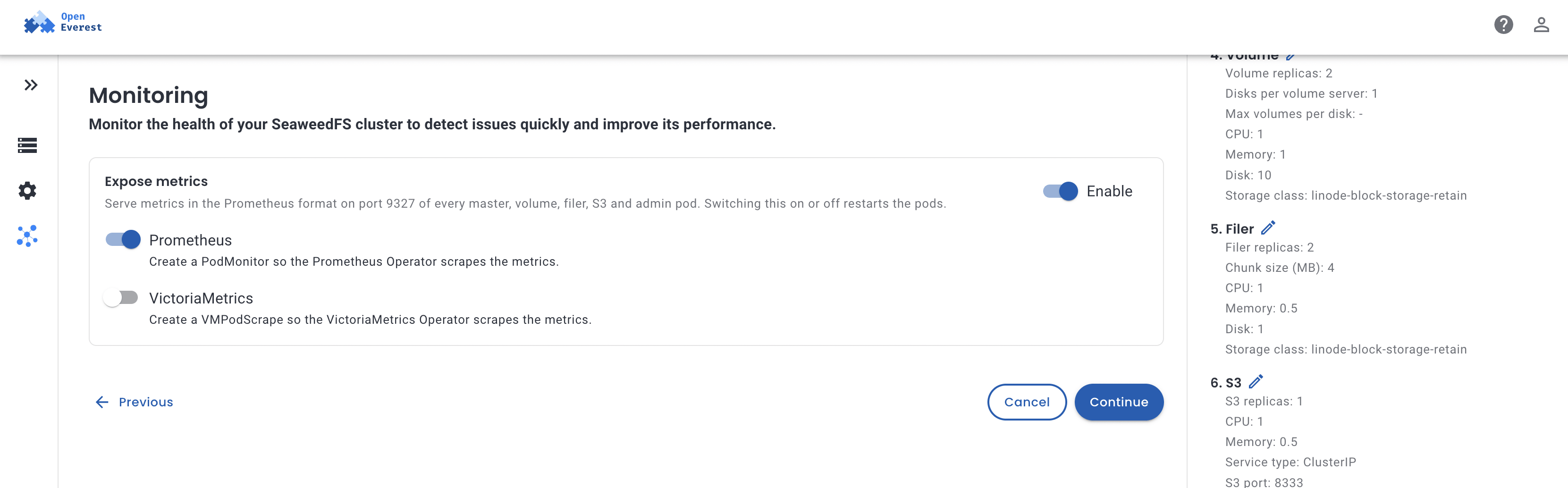
Every series carries core_openeverest_io_instance and core_openeverest_io_component labels, so per-component dashboards and alerts are a count by away. On our cluster, Prometheus scraped all ten pods: 3 masters, 3 volume servers, 2 filers and 2 S3 gateways.
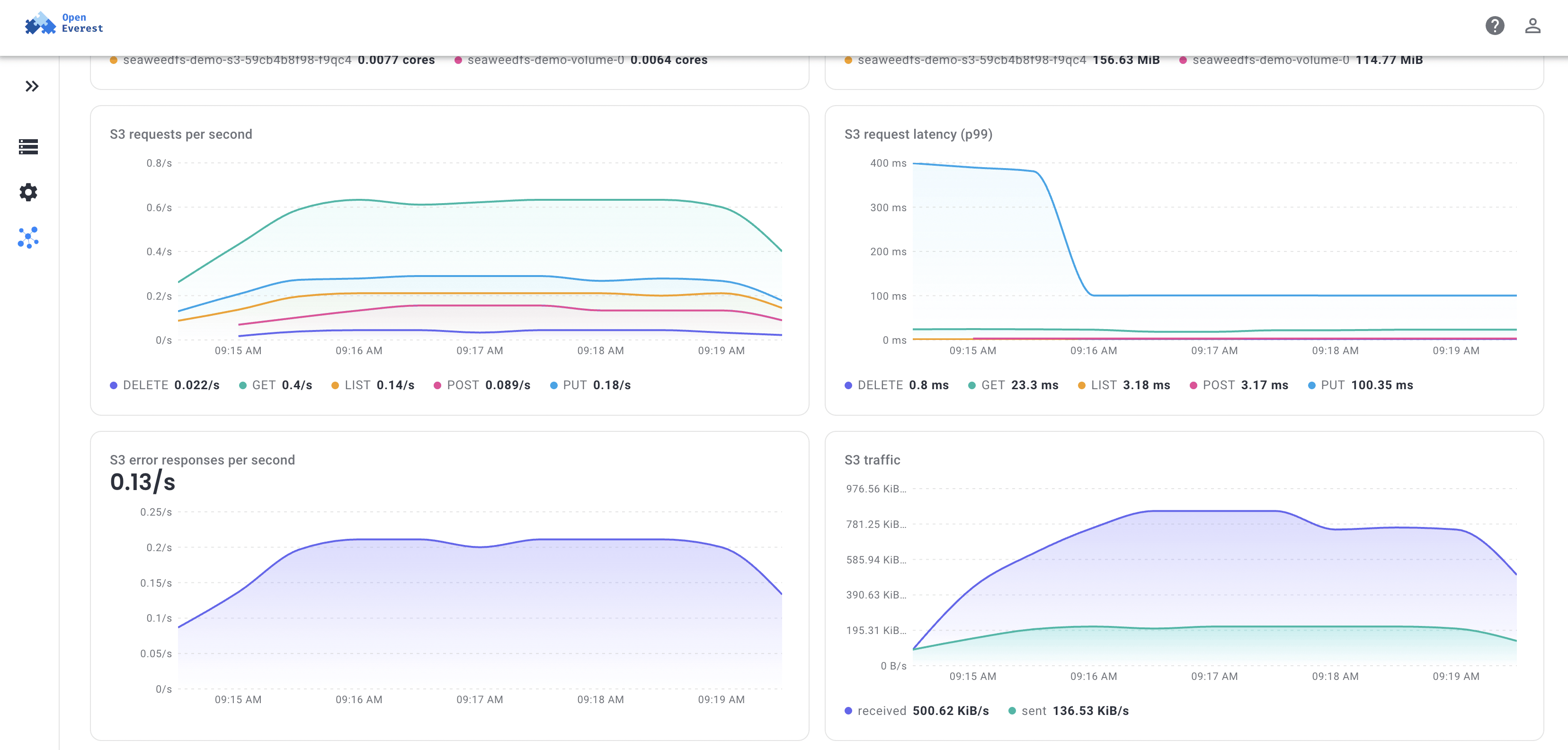
You do not need Grafana for a quick look. The OpenEverest Metrics plugin adds a Metrics tab to the instance page with CPU and memory per pod, S3 requests per second and p99 latency by method, error responses by status code, S3 traffic, bucket size and object count, volume server disk usage, and volume slots used. That last one warns you before you hit the bucket limit from the Sizing step.
What is not there yet
Sovereignty also means not lying to yourself about the gaps. As of provider v0.2.0:
- It is an MVP. The OpenEverest SeaweedFS provider is under active development, and CRDs and defaults still change between versions. Pilot it, test it - but do not move your only copy of critical data onto it yet.
- Client TLS goes through an Ingress. Traffic between SeaweedFS components is mTLS, but the S3 endpoint itself serves plain HTTP inside the cluster. For HTTPS, enable the S3 Ingress with a TLS secret. Native HTTPS on the gateway has already landed in the SeaweedFS operator and is next for the provider.
- Encrypt the disks underneath. Use a StorageClass with volume encryption (most CSI drivers support it) so data at rest is protected even if a disk leaves your hands.
- One cluster is one failure domain. For disaster recovery, plan a second site. The SeaweedFS operator already ships
SeaweedBackupandSeaweedRestoreresources; wiring them into the provider is on the roadmap.
The sovereign S3 checklist
Before you call your object storage sovereign, check that:
- It runs on infrastructure whose operator is subject only to the jurisdiction you choose.
- Authentication is mandatory, and the access keys exist only in your systems.
- Internal traffic is encrypted (mTLS), and client traffic is encrypted at the edge.
- The software is permissively licensed, and you can build and run it without the vendor’s permission.
- Data is replicated, and the system survives node maintenance without downtime.
- Your database backups land in it, and you have actually tested a restore.
- Clients only use the standard S3 API, so you can leave whenever you want.
SeaweedFS on Kubernetes, managed by OpenEverest, gets you most of the way there today - with open source software on hardware you choose.
Try it yourself. OpenEverest is open source and installs into any Kubernetes cluster in minutes. Add the SeaweedFS provider, create an instance from the UI or with kubectl, and point your database backups at it. Tell us what breaks, and pick up an issue - the provider grew out of the LFX Mentorship program, and community contributions keep it moving.
Planning sovereign storage for production? Book a call with our team. We can go through your requirements - jurisdiction, compliance, sizing and backups - and show how the Solanica Platform runs sovereign S3 next to your databases, with enterprise support and no lock-in.


 Solanica Team