Branch Methods
A Branch has a method that decides what the branch is. The resource,
the UI and the operations are the same for every method; they differ in
speed, isolation and requirements.
| Method | A branch is | Providers | Status |
|---|---|---|---|
Clone (default) | a new database in the same instance | provider-cloudnative-pg | available |
Snapshot | a new single-node Instance started from a volume snapshot | provider-cloudnative-pg, provider-mariadb, provider-mssql | available |
Backup | a new Instance restored from a backup, optionally to a point in time | — | planned |
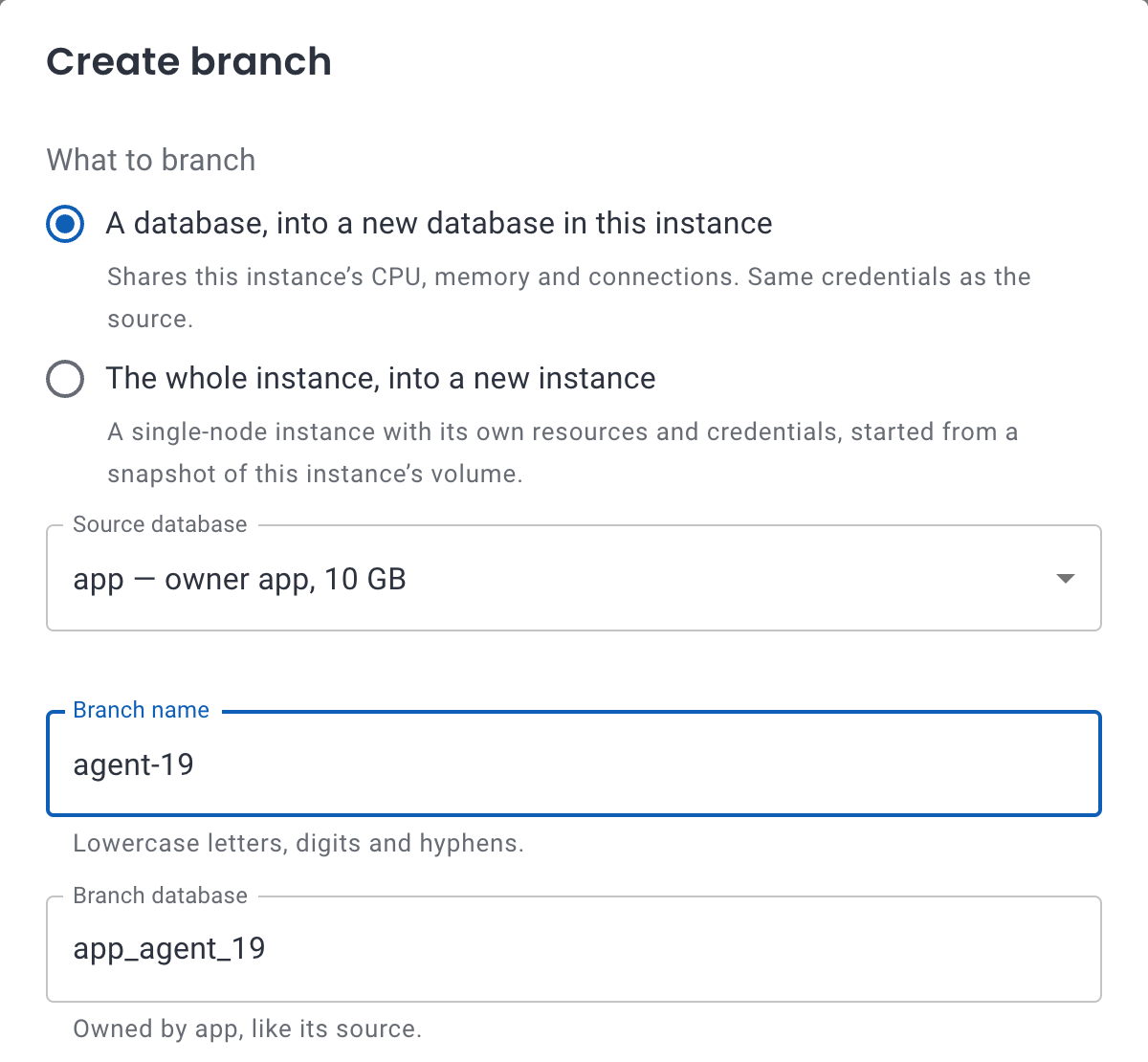 The create dialog: a database branch or an instance branch.
Database branches (Clone)
A database branch is a new database in the same PostgreSQL server. The plugin creates it with:
CREATE DATABASE app_feature_x TEMPLATE app STRATEGY FILE_COPY;
with file_copy_method = clone,
new in PostgreSQL 18. Instead of copying the source's files, PostgreSQL asks
the file system to clone them. On a file system with reflinks, such as XFS,
Btrfs or ZFS, the branch shares every block with the source and takes no
extra space until either side writes. See Storage requirements.
apiVersion: plugin-branching.plugins.openeverest.io/v1alpha1
kind: Branch
metadata:
  name: feature-x
  namespace: team-a
spec:
  instanceRef:
    name: orders-db
  source:
    database: app
  database: app_feature_x
Copying a 10 GB database
Measured with PostgreSQL 18.6 on CloudNativePG, a primary and a standby, on network block storage formatted as XFS:
| How | Time | Extra space |
|---|---|---|
CREATE DATABASE … TEMPLATE (PostgreSQL's default, WAL_LOG) | 86 s | +10.3 GB |
STRATEGY FILE_COPY with file_copy_method = copy | 61 s | +10.2 GB |
Database branch (file_copy_method = clone) | 0.13 s | +0 bytes |

Ten branches of the same database, requested at once, were all Ready in
6.8 seconds. Deleting all ten took 4 seconds.
Credentials and ownership
- The branch database has the same owner as its source. Connect to it with the source's credentials: only the database name changes.
- Roles are the instance's, so they're shared with the source.
- A branch can be the source of another branch.
Connections to the source
PostgreSQL copies a database only while nobody else is connected to it.
spec.sourceConnections decides what the plugin does about it:
Terminate(default): disconnects the source database's sessions for the duration of the copy.status.terminatedConnectionsreports how many.Fail: waits until the source is idle, retrying with backoff. The branch staysPendingwith the reasonSourceBusymeanwhile.
The copy itself takes milliseconds, but FILE_COPY first forces a
checkpoint, which writes the source's dirty data to disk while its clients
are kept out. The plugin runs a CHECKPOINT before disconnecting them, so
little is left to write by then. With 16 clients writing about 2,300
transactions per second to a 1.5 GB database, their longest pause was
0.37 seconds (0.62–0.84 seconds without the early checkpoint). Sources with
more dirty data pause longer, up to seconds. Branch development and staging
databases this way, or sources that are idle at the moment. To branch a busy
production database, use an instance branch.
Replicas
Standbys replay the branch with their own file_copy_method. Set it in the
instance's PostgreSQL parameters so they clone the branch too; otherwise they
copy every branch in full. The Branches tab and the ReplicasCopyOnWrite
condition warn about it.
spec:
  components:
    engine:
      parameters:
        postgresql:
          parameters:
            file_copy_method: clone
What can't be branched
- The
postgres,template0andtemplate1databases. - Databases owned by a superuser or an operator role.
The UI lists the instance's databases with the reason a database can't be branched.
Instance branches (Snapshot)
An instance branch is a new PostgreSQL instance of its own, with its own pods, CPU, memory, configuration, endpoint and credentials, and every database and role of the source. Its volume starts from a copy-on-write snapshot of the source's volume. This is the model Neon made popular, on standard PostgreSQL and standard Kubernetes storage.
apiVersion: plugin-branching.plugins.openeverest.io/v1alpha1
kind: Branch
metadata:
  name: pr-42
  namespace: team-a
spec:
  instanceRef:
    name: orders-db
  method: Snapshot
  instanceName: orders-db-pr-42    # the branch Instance, in the same namespace
How a branch is made
- The plugin records the primary's WAL position when the branch is
requested (
status.targetLSN). - It waits for a standby to replay up to it, so the branch has everything committed before the request, and checkpoints it. Without a standby, it snapshots the primary.
- It takes a VolumeSnapshot of that instance's volume
(
status.snapshotSource,status.volumeSnapshot). - It creates the branch Instance from the snapshot: one node, with the source's version, configuration, resources and storage, and credentials of its own.
The branch Instance appears in OpenEverest like any other instance, and the Branches tab links to it. A branch is ready in about 25 seconds, whatever the size; most of that is PostgreSQL starting up.
Branching production
Because the snapshot is taken from a standby, the primary isn't touched. We created an instance branch while the source served about 1,450 transactions per second: the branch was ready in 35 seconds, and the source's clients saw no errors and no pause longer than 84 ms.
Requirements
- Storage with a VolumeSnapshotClass whose snapshots and clones are copy-on-write. See Storage requirements.
- PGDATA and WAL on one volume (no
walStorage). - PostgreSQL 15 or later, to checkpoint without a superuser.
- A provider-cloudnative-pg version that can bootstrap an Instance from a volume snapshot, included with early access.
Snapshots, ownership and deletion
- The snapshot is named
<instanceName>-<hash of the Branch's UID>, labeled for the branch and annotated for the branch Instance only. The provider starts an Instance from a snapshot only when it's annotated for that Instance, so users of the Everest API can't bootstrap instances from arbitrary snapshots. - Deleting the Branch deletes the Instance, then the snapshot.
deletionPolicy: Retainkeeps both. - Snapshot branches are deleted with their source: Instance first, then snapshot.
MariaDB instance branches
The Snapshot method, with reset, restore points, rollback and promote,
works the same for provider-mariadb instances (standalone, replication or
Galera), with these differences:
- A branch is snapshotted from a replica once it has applied the primary's
transactions as of the request (
MASTER_GTID_WAIT), or from a Galera node after awsrep_sync_waitread. - The branch is a standalone instance. The plugin clears the replication
settings a replica's snapshot carries (
RESET SLAVE ALL). - Branches never share their source's root password: the provider replaces it once the branch runs, which restarts a standalone node once. The user password stays the instance's own.
- mariadb-operator has no hibernation yet, so to replace volumes the plugin pauses the operator and scales the StatefulSet to 0, then has the operator apply the instance's users, grants and databases again.
- A Galera cluster restarts from one node on rollback and promote: the restore point's primary, or the node given the branch. The other nodes start empty and copy its data (SST) as they join, so every node ends up with the same data. The plugin has mariadb-operator bootstrap the cluster from that node, and lets the operator choose again for later recoveries.
Measured with a two-node replication instance of 4.5 GB on ZFS: branch 67–72 seconds (including the root password rotation), reset 55–60 s, restore point 6 s, rollback 50–80 s, promote about 80 s. A three-node Galera cluster with little data rolled back in about 2 minutes and was promoted into in under 3.
The Branches tab on a MariaDB instance offers instance branches only, along with restore points, rollback and promote.
SQL Server instance branches
The Snapshot method works for provider-mssql instances, standalone or
Availability Group, with reset for every branch and restore points and
rollback for standalone instances. The branch is a standalone SQL Server
started from a snapshot of the source's data volume through the provider's
bootstrap.volumeSnapshot
parameter.
- What is snapshotted. For an Availability Group, a synchronized,
connected secondary, once each of its databases has hardened the
primary's log as of the request (recorded in the Branch's
targetLSNasdb=lsn,…). For a standalone instance, or a group without such a secondary, the instance itself after aCHECKPOINT. The snapshot is crash-consistent: SQL Server recovers the copy as after a power cut, so it has every transaction committed before the snapshot. No freeze is needed, so the source and its clients aren't paused. - The copy is cleaned up before it serves. A copy's
masterstill describes its source: its Availability Groups, endpoints, certificates, backup credentials, Agent jobs and server name. Started as is, a copy of an AG secondary rejoins the source's group as that replica and disrupts it. The MSSQL Operator starts every copy fenced (no network but the operator's, no DNS, Agent off), drops the copy's groups, endpoints, AG certificate and S3 credentials, disables Agent jobs, renames the server after its pod, then restarts it unfenced. The source's group is never contacted. - The branch is a standalone Instance in the Developer edition, with the source's version, image, configuration and storage. Availability Group settings and backups are left out.
- Credentials. The SA password travels with the data. The plugin records the source's SA password with each snapshot, and the operator switches a branch to its own SA password before it's Ready. Other logins are the source's.
- Reset and rollback stop the instance with the operator's
spec.paused, swap the data volume, and resume it; the operator cleans up the new data again before the instance is Ready. - Not yet:
- Restore points and rollback of Availability Group instances: the replicas' volumes would have to be swapped together.
- Promote: a branch's data was cleaned up as a copy (another server name, disabled jobs, no backup credentials), which the source must not inherit. A promotion is refused before anything is changed.
Requires mssql-operator v0.1.17 or later, and a VolumeSnapshotClass for the instance's storage class (ZFS LocalPV in the measurements). Data and log files must be on one volume; instances with separate volumes are refused.
Measured with SQL Server 2025 on ZFS, sources with 2 million rows under write load: branch of a standalone instance 36–39 s, branch of an Availability Group secondary 37 s with no disconnection in the source's group, restore point 3 s, rollback 24 s, reset 29 s, delete 9–14 s.
The Branches tab on a SQL Server instance offers instance branches, reset, and restore points and rollback on standalone instances.
Which one to use
| You need | Database branch | Instance branch |
|---|---|---|
| A database for an agent task or a CI job | 0.1 s, no new pods | works, but ~25 s and a server each |
| Hundreds of short-lived copies | nearly free | a server for each one |
| To branch a busy production database | pauses its clients for seconds | no effect on the primary |
| Load tests or heavy queries | competes with the source for CPU | its own CPU and memory |
| Different configuration or extensions | the source's settings | its own |
| A preview environment with its own endpoint | same endpoint, another database | its own endpoint |
| Every database and role | one database | the whole instance |