Reset, Restore Points, Rollback and Promote
A branch is more than a copy. The usual loop, for a developer or an agent, is: branch, work on the branch, then throw the work away or keep it. The plugin gives every branch the rest of that loop.
| What it does | Instance branch (Snapshot) | Database branch (Clone) | |
|---|---|---|---|
| Reset a branch | the branch gets a fresh copy of its source, as of now | the branch Instance restarts on a new snapshot of the source: same Instance, endpoint and credentials | the branch database is dropped and cloned again |
| Restore point | a point to come back to, before a risky change | a snapshot of every instance's volume, standbys first | a hidden clone of one database, <db>_rp_<hash> |
| Rollback | the instance, or database, goes back to a restore point | every instance restarts on its volume from the restore point | the database is replaced with a clone of the restore point |
| Promote a branch | the source gets the branch's data | the source's primary restarts on a snapshot of the branch; its standbys are rebuilt from it | the branch database is renamed to the source's name; the old source is set aside and dropped |
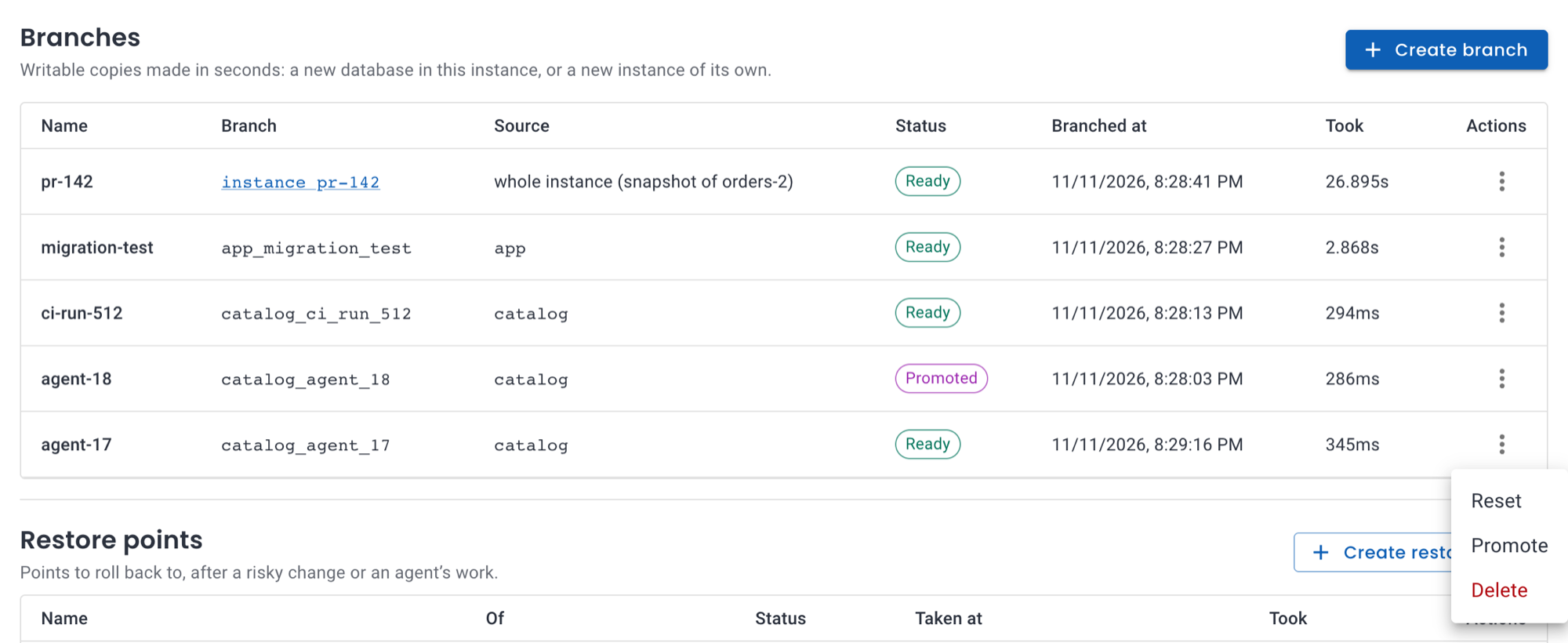 In the Branches tab: the branch menu has Reset, Promote and Delete. The Restore points section has Create restore point, Roll back and Delete.
Promote can be undone
Promoting takes a restore point of the source first, named
<instance>-before-<branch>-<hash>. Rolling back to it undoes the
promotion. The source keeps its endpoint and credentials either way, so the
application doesn't change its connection string.
The promoted branch stays, in phase Promoted, until you delete it.
Deleting a promoted branch never touches the source.
With kubectl
A restore point is a RestorePoint resource:
# A restore point of the whole instance: a snapshot of every instance's volume.
apiVersion: plugin-branching.plugins.openeverest.io/v1alpha1
kind: RestorePoint
metadata:
  name: before-migration
  namespace: team-a
spec:
  instanceRef:
    name: orders-db
  method: Snapshot
---
# A restore point of one database, with the Clone method.
apiVersion: plugin-branching.plugins.openeverest.io/v1alpha1
kind: RestorePoint
metadata:
  name: app-before-migration
  namespace: team-a
spec:
  instanceRef:
    name: orders-db
  method: Clone
  database: app
Reset, rollback and promote are Operation resources. Operations are
immutable: create a new one to run again.
apiVersion: plugin-branching.plugins.openeverest.io/v1alpha1
kind: Operation
metadata:
  generateName: reset-feature-x-
  namespace: team-a
spec:
  instanceRef:
    name: orders-db
  type: Reset              # the branch gets a fresh copy of its source
  branchRef:
    name: feature-x
---
apiVersion: plugin-branching.plugins.openeverest.io/v1alpha1
kind: Operation
metadata:
  generateName: rollback-before-migration-
  namespace: team-a
spec:
  instanceRef:
    name: orders-db
  type: Rollback           # the instance (or database) goes back to the restore point
  restorePointRef:
    name: before-migration
---
apiVersion: plugin-branching.plugins.openeverest.io/v1alpha1
kind: Operation
metadata:
  generateName: promote-feature-x-
  namespace: team-a
spec:
  instanceRef:
    name: orders-db
  type: Promote            # the source gets the branch's data; a restore point is taken first
  branchRef:
    name: feature-x
generateName needs kubectl create, not kubectl apply:
kubectl create -f operations.yaml
kubectl -n team-a get operations
NAME                     INSTANCE    TYPE      BRANCH      RESTORE POINT   PHASE       DURATION   AGE
promote-feature-x-7k2mq  orders-db   Promote   feature-x                   Succeeded   2.431s     1m
Operations on an instance run one at a time, in creation order. Each
step is recorded in status.progress, so an operation interrupted by a
restart resumes where it stopped and never repeats a step. See the
Operation reference.
How long it takes
Time per operation on a 10 GB database, with no clients connected:

| Instance branch (ZFS LocalPV) | Database branch (XFS) | |
|---|---|---|
| Branch | ~25 s | 0.13 s |
| Reset | 21–22 s | 0.7–1.3 s |
| Restore point | 6–8 s | 0.2 s |
| Rollback | 19–25 s | 0.4–1.0 s |
| Promote | 30–33 s, plus the standbys' rebuild in the background | 2.4 s |
Instance branch times don't depend on the size of the data.
An agent's loop, end to end
A scripted run against the 10 GB database. The agent's task was a schema change: add a column, backfill it and index it.
- Branch
appintoapp_agent_19: 0.14 s. - The agent makes a mistake: a
DELETEwithout aWHERE, then a dropped table. - Reset the branch: 0.7 s. The data is back as it is in
app. - The agent runs the right migration and its tests pass on the branch. The migration took 71 s; that's PostgreSQL building an index on 70 million rows, not branching.
- A human approves and the branch is promoted: 2.5 s. A restore
point of
appis taken first.appnow has the new column, and the application keeps its connection string. - Undo: rolling back to that restore point takes 0.4 s.
The mistake never reached app, and branching took 3.7 seconds of the loop.
Things to know
- Snapshot operations restart the instance. Rolling back to a
Snapshotrestore point or promoting an instance branch stops the source instance to swap its volumes; resetting an instance branch restarts the branch. Clients are disconnected for about 20–35 seconds. On CloudNativePG the plugin setssmartShutdownTimeoutto 0 for the swap and restores it afterwards, so connected clients don't hold up the shutdown: a rollback with 16 clients connected took 23 seconds.Cloneoperations disconnect only the sessions of the database involved. - A rollback needs the same primary. The instance's primary must be the one the restore point was taken on: switch over first otherwise. Instances added since the restore point are rebuilt from the primary.
- Promote rebuilds the source's standbys with a full copy
(
pg_basebackup). - Roles aren't promoted. Roles created on the source after the branch was made aren't on the branch, so they aren't on the source after promoting it.
- Take a new full backup after a rollback or promote if backups are enabled: the instance is rewound under its WAL archive.
- Restore points keep space. On ZFS, restore points keep the volumes they were taken of. See Retained volumes on ZFS.
- SQL Server. Reset works for every SQL Server branch; restore points and rollback for standalone instances only; promote isn't supported yet and is refused before anything changes. See SQL Server instance branches.
- In-use objects are protected. Branches and restore points used by an unfinished operation can't be deleted through the API, and their finalizers wait for the operation. Once begun, an operation finishes.