Solanica vs Azure SQL Managed Instance
Azure SQL Managed Instance runs SQL Server for you as a service in Azure. Solanica, built on the open source OpenEverest project, runs SQL Server in Linux containers on Kubernetes clusters you operate, on any cloud or in your own data center.
Both give you SQL Server with automatic failover, backups with point-in-time recovery, and routine operations handled for you. The differences are who runs it, where it can run, and how easily your databases can leave. This page covers both sides, including the places where Managed Instance is ahead.
Azure SQL Managed Instance
A fully managed SQL Server service, operated by Microsoft.
- Runs only in Azure, inside a subnet of your virtual network
- Microsoft patches, backs up, and fails over the instance
- License included in the price, or your own licenses through Azure Hybrid Benefit
- Backups are managed by Azure. You can export only copy-only full backups
Solanica + OpenEverest
Self-hosted SQL Server on Kubernetes, run by an operator.
- Runs on any Kubernetes cluster, including on-prem and air-gapped ones
- The operator automates failover, backups, upgrades, and TLS. Your team runs the cluster
- Bring your own SQL Server licenses, or use the free Developer and Express editions
- Full, differential, and log backups as standard .bak files in your own bucket
Side by side
| Solanica + OpenEverest | Azure SQL Managed Instance | |
|---|---|---|
| Where and who | ||
| Where it runs | Any Kubernetes cluster: AKS, EKS, GKE, OpenShift, RKE2, or bare metal | Azure regions |
| On-prem and air-gapped | Supported | Not available |
| Who operates it | Your team, with operator automation and Solanica support | Microsoft |
| SQL Server versions | 2019, 2022, and 2025, each pinned to a specific cumulative update | A Microsoft-managed engine, aligned with SQL Server 2022 or 2025 through the update policy, or always on the latest features |
| Availability and data | ||
| High availability | Always On availability groups with automatic failover and synchronous or asynchronous replicas | Built in. General Purpose restarts the engine on another node over remote storage. Business Critical runs a four-replica availability group |
| Readable secondaries | Yes, through a separate read-only Service | Business Critical tier only, with one readable secondary |
| Failover to another region | Not automated. Restore from backups in another cluster | Failover groups with automatic geo-failover |
| Backups | Full, differential, and log backups on your schedule, to your own S3-compatible bucket | Automatic full, differential, and log backups, kept for 1 to 35 days, with long-term retention for up to 10 years |
| Point-in-time recovery | Standalone instances. Not yet for availability groups | Every database |
| Taking backups elsewhere | Standard .bak files that restore on any SQL Server of the same or a later version | Copy-only full backups only. They restore to SQL Server only when the update policy matches the target version |
| Security and control | ||
| Encryption | TLS on by default, with your own certificates if you want. TDE is available in the engine and you manage its keys | TLS, and TDE on by default with a service-managed key or your own key in Azure Key Vault |
| Authentication | SQL logins | SQL logins and Microsoft Entra ID |
| Instance configuration | Full control through mssql.conf: trace flags, tempdb, separate data and log volumes | A limited set of global trace flags, one log file per database, no host access |
| Operations and cost | ||
| Monitoring | Prometheus metrics from SQL Server DMVs, plus Query Store | Azure Monitor and portal performance views, plus Query Store |
| Managed through | Web UI, REST API, or Kubernetes resources in Git | Azure portal, Azure CLI, ARM and Bicep templates, or Terraform |
| Licensing | Your own licenses. Developer and Express editions are free | License included, or your own licenses through Azure Hybrid Benefit |
| Other databases | PostgreSQL, MySQL, MongoDB, and more in the same console | SQL Server only |
A highlighted cell marks the stronger option for that row. Managed Instance details come from Microsoft's public documentation as of October 2026.
Where it runs
A Managed Instance is deployed into a dedicated subnet of your Azure virtual network, so it gets private IP addresses in your network. The machines underneath belong to a virtual cluster that Microsoft operates. You have no access to the host or its operating system, and the service is available only in Azure regions.
With Solanica, SQL Server runs as pods in your own Kubernetes cluster. Data sits on your persistent volumes, metrics go to your Prometheus, and backups go to a bucket you own. The same setup runs on AKS, on another cloud, or on servers in your own data center, and it doesn't need a connection to Azure.
This tends to matter when:
- a regulation or customer contract requires data to stay in a specific country or facility
- the application runs on AWS, Google Cloud, or on-prem, and SQL Server needs to sit next to it
- the network has no outbound internet access
- you want SQL Server deployed, upgraded, and audited the same way as everything else on Kubernetes
Failover
Managed Instance handles high availability for you. General Purpose keeps data and log files in Azure Blob Storage. When a node fails or is patched, Azure starts the database engine on another node and reattaches the files. Business Critical runs a four-replica Always On availability group on local SSDs, with one secondary open for read-only queries. Zone redundancy, and failover groups for a second region, are options on top.
Solanica's operator builds a standard Always On availability group across SQL Server pods, with certificate-secured endpoints and automatic seeding. A sidecar in each pod tracks the replica's role and renews a Kubernetes Lease while it is primary. If the primary disappears or stops responding, the Lease expires and the operator promotes a synchronized secondary. It never forces a failover that could lose committed transactions unless you explicitly allow it. For planned events such as node drains and rolling upgrades, the primary role is handed over before the pod stops.
We tested this with pod deletes, node drains, hard kills, and network partitions while a client wrote a row every 100 ms. On the final build, all 20 fault runs passed and none of the 32,270 acknowledged writes were lost. Planned failovers paused writes for 2 to 10 seconds. The details are in Chaos Testing SQL Server Availability Groups on Kubernetes.
One thing the operator doesn't do today is fail over to another region. An availability group lives inside one Kubernetes cluster, so recovering in a second region means restoring backups there.
Backups and getting your data out
Managed Instance takes full backups weekly, differential backups every 12 or 24 hours, and log backups about every 10 minutes. You can restore to any point in a retention window of up to 35 days, and keep long-term backups for up to 10 years. You don't manage any of it, and you can't take differential or log backups yourself.
Getting a database out as a .bak file is more limited. You can take a copy-only full backup to Azure Blob Storage, but not of a database encrypted with the default service-managed TDE key, because that key can't be exported. The backup restores only to the SQL Server version that matches the instance's update policy, 2022 or 2025. Backups from instances on the Always-up-to-date policy restore only to other Managed Instances on that policy.
Solanica's operator uses SQL Server's native BACKUP TO URL to write full, differential, and log backups to S3-compatible storage, such as Amazon S3, MinIO, Ceph, or an on-prem appliance. You set schedules and retention per database. With log backups enabled, you can restore a standalone instance to a specific point in time.
The backups are ordinary SQL Server .bak files. You can restore them with plain T-SQL on any SQL Server of the same or a later version, on Linux or Windows, without OpenEverest.
The current limits are worth knowing:
- Backups need SQL Server 2022 or later, the first release that can write to S3.
- The destination has to be S3-compatible. On AKS, that means a store such as MinIO rather than Azure Blob Storage.
- Point-in-time restore works for standalone instances. Availability groups can be backed up and restored, but not yet to a point in time.
Licensing and cost
On Managed Instance, the SQL Server license is part of the per-vCore price. If you already own licenses with Software Assurance, Azure Hybrid Benefit removes the license part of the price.
On Kubernetes, you license SQL Server yourself. Under Microsoft's rules for containers, you either license the cores given to each container, with a minimum of four core licenses per container, or license every physical core of the hosts with Enterprise edition and Software Assurance and run as many containers as you like. With Software Assurance, a passive secondary used only for failover doesn't need its own license, but readable secondaries do. Standard edition is limited to basic availability groups with two replicas and no readable secondary. Developer edition is free for non-production use, and Express is free for small databases. Pay-as-you-go licensing through Azure Arc doesn't cover SQL Server in containers.
Managed Instance: a production instance
- vCores, with the license included or reduced by Azure Hybrid Benefit
- Business Critical tier for a readable secondary or In-Memory OLTP
- Storage per GB, plus extra IOPS on Next-gen General Purpose
- Backup storage beyond the free allowance, and long-term retention
- A second instance in another region for a failover group. The license is waived when it is only a standby
Total: one price per vCore that bundles compute and license, plus storage and backups
Solanica: the same workload on Kubernetes
- Kubernetes node compute, in your cloud account or on your own servers
- SQL Server core licenses for the active replicas
- Persistent volumes at your storage provider's prices
- Backups in your own S3-compatible bucket
- Developer edition for dev and test environments at no license cost
- The Solanica subscription for the platform and support
Total: infrastructure, plus your licenses, plus the Solanica subscription
Which one costs less depends mostly on licensing. Teams that already own SQL Server licenses, run many dev and test environments, or have spare Kubernetes capacity tend to save the most. For a single small production database that already lives in Azure, Managed Instance can be cheaper once you count the people needed to run Kubernetes.
Compatibility
Neither option is the full SQL Server you may run on Windows today. Solanica runs SQL Server on Linux, and Managed Instance is a managed service with its own restrictions. These are the differences that come up most often.
| SQL Server on Linux (Solanica) | Azure SQL Managed Instance | |
|---|---|---|
| FILESTREAM and FileTable | Not supported | Not supported |
| Merge replication | Not supported | Not supported |
| Linked servers | SQL Server targets only | SQL Server and Azure SQL targets only |
| Differential and log backups you run | Yes | No, copy-only full backups only |
| Multiple log files per database | Yes | No |
| In-Memory OLTP | Yes | Business Critical tier only |
| Trace flags and server settings | Any, through mssql.conf | A limited set of global trace flags |
| SQL Server Agent | Yes, without CmdExec, PowerShell, or SSIS job steps, and without alerts | Yes, including SSIS job steps. Agent settings are read-only |
| Microsoft Entra ID logins | Not available in containers | Yes |
Sources: Microsoft's lists of unsupported features for SQL Server on Linux and of T-SQL differences in Azure SQL Managed Instance.
Where Managed Instance is ahead
Better to know this before a migration than halfway through one.
- There is nothing to operate. Microsoft patches the engine and the operating system, replaces failed hardware, and runs backups. Solanica's operator automates most of that, but someone on your team still runs the Kubernetes cluster and the storage underneath.
- Failover groups replicate to another region and fail over automatically. Solanica keeps an availability group inside one cluster, and cross-region recovery means restoring from backups.
- Microsoft Entra ID authentication, Defender for SQL, and Microsoft Purview work out of the box. None of them are available for SQL Server in containers.
- Every database gets point-in-time restore, and long-term retention can keep backups for 10 years. Solanica offers point-in-time restore for standalone instances today.
- Managed Instance link connects an existing SQL Server to Azure for hybrid disaster recovery and migration.
- Managed Instance has been generally available since 2018. Solanica's SQL Server support is much newer.
Moving from Managed Instance
Applications keep the same drivers and T-SQL. Only the server name in the connection string changes. How you move the data depends on the instance's update policy.
- SQL Server 2022 or 2025 update policy. Take a copy-only full backup to Azure Blob Storage, copy the .bak file into your S3-compatible bucket, and restore it into an instance running the same SQL Server version or a later one. The operator can restore directly from a backup URL. Databases encrypted with the service-managed TDE key need TDE turned off first, or switched to a customer-managed key that the new server can also use.
- Always-up-to-date update policy. Native backups won't restore on SQL Server, so move the data with transactional replication or an export and import.
Before you start, check for Microsoft Entra ID logins, which need to become SQL logins, and for SQL Server Agent jobs with SSIS steps.
Which one to pick
Managed Instance
If you're committed to Azure and don't want to run infrastructure, or you need Entra ID, cross-region failover groups, or long backup retention handled for you.
Solanica
If SQL Server has to run outside Azure, on-prem, or across several clouds, or you already own licenses and run Kubernetes and want backups and configuration fully under your control.
Talk to us
SQL Server support in Solanica Platform is a commercial extension to OpenEverest, available to Solanica customers. It includes the SQL Server operator, the OpenEverest provider, and support from our engineers. If you're planning a move off Managed Instance, or SQL Server on Kubernetes in general, we're happy to go through it with you.
For more background, read how we brought SQL Server to Kubernetes and how point-in-time recovery works.
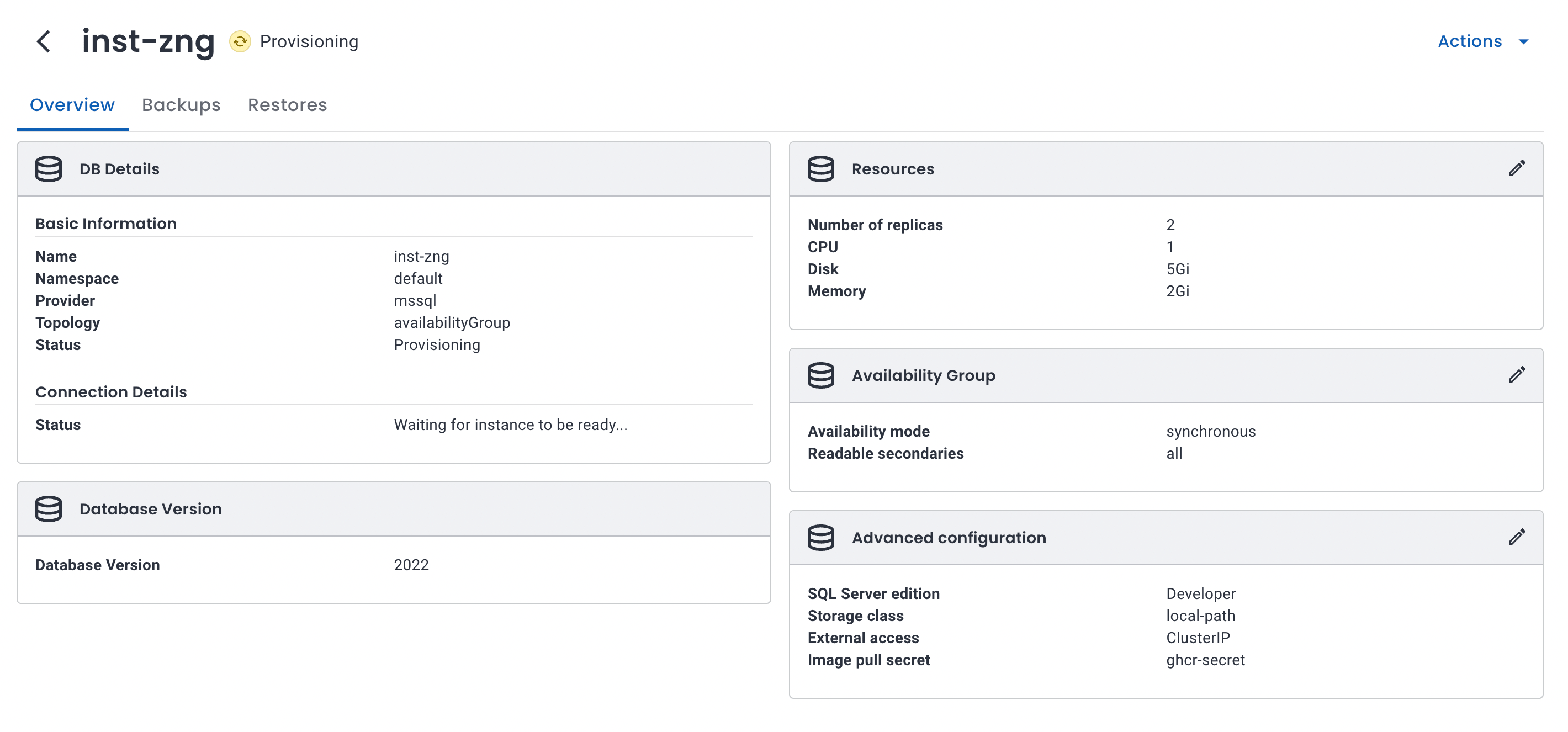
Microsoft, Azure, Azure SQL Managed Instance, SQL Server, and Microsoft Entra are trademarks of the Microsoft group of companies. Solanica and OpenEverest are not affiliated with or endorsed by Microsoft, and these names are used here only to identify the products being compared. The screenshot is of OpenEverest. The licensing notes are a summary, not licensing advice. Microsoft's Product Terms govern how SQL Server may be licensed.